<?xml version="1.0" encoding="utf-8"?>
<feed xmlns="http://www.w3.org/2005/Atom">
    <id>https://www.xiazhiri.com/</id>
    <title>Xiazhiri</title>
    <updated>2026-09-15T05:59:09.432Z</updated>
    <generator>https://github.com/jpmonette/feed</generator>
    <author>
        <name>likaci</name>
        <email>j2jm2ky9@duck.com</email>
        <uri>https://www.xiazhiri.com</uri>
    </author>
    <link rel="alternate" href="https://www.xiazhiri.com/"/>
    <subtitle>Sun of Summer</subtitle>
    <icon>https://www.xiazhiri.com/favicon.svg</icon>
    <rights>All rights reserved 2026, likaci</rights>
    <entry>
        <title type="html"><![CDATA[nRF52, Amiibo, Voltage Glitch Attack and Apple Find My ]]></title>
        <id>https://www.xiazhiri.com/nrf52-amiibo-voltage-glitch-and-apple-find-my</id>
        <link href="https://www.xiazhiri.com/nrf52-amiibo-voltage-glitch-and-apple-find-my"/>
        <updated>2024-05-18T04:00:00.000Z</updated>
        <summary type="html"><![CDATA[Recently, I purchased an Amiloop to and was amazed to discover that it used an nRF52832 chip. This device, costing a mere $2.50, boasts both Bluetooth and NFC functionality, demonstrating the cost-effectiveness of Chinese manufacturing.
Further exploration revealed even more intriguing aspects. Not only can this tiny device emulate Amiibo, but it can also be flashed with Espruino firmware to function as a sensor, Bluetooth beacon, or even a simulated AirTag. It can even report data offline via Apple's Find My network.]]></summary>
        <content type="html"><![CDATA[<main class="notion light-mode notion-page notion-block-4bd48f0e62b846f692c4cf85d5c4101d"><div class="notion-viewport"></div><div class="notion-collection-page-properties"><div class="notion-collection-row"><div class="notion-collection-row-body"><div class="notion-collection-row-property"><div class="notion-collection-column-title"><svg viewBox="0 0 14 14" class="notion-collection-column-title-icon"><path d="M10.889 5.5H3.11v1.556h7.778V5.5zm1.555-4.444h-.777V0H10.11v1.056H3.89V0H2.333v1.056h-.777c-.864 0-1.548.7-1.548 1.555L0 12.5c0 .856.692 1.5 1.556 1.5h10.888C13.3 14 14 13.356 14 12.5V2.611c0-.855-.7-1.555-1.556-1.555zm0 11.444H1.556V3.944h10.888V12.5zM8.556 8.611H3.11v1.556h5.445V8.61z"></path></svg><div class="notion-collection-column-title-body">date</div></div><div class="notion-collection-row-value"><span class="notion-property notion-property-date">May 18, 2024</span></div></div><div class="notion-collection-row-property"><div class="notion-collection-column-title"><svg viewBox="0 0 14 14" class="notion-collection-column-title-icon"><path d="M7 4.568a.5.5 0 00-.5-.5h-6a.5.5 0 00-.5.5v1.046a.5.5 0 00.5.5h6a.5.5 0 00.5-.5V4.568zM.5 1a.5.5 0 00-.5.5v1.045a.5.5 0 00.5.5h12a.5.5 0 00.5-.5V1.5a.5.5 0 00-.5-.5H.5zM0 8.682a.5.5 0 00.5.5h11a.5.5 0 00.5-.5V7.636a.5.5 0 00-.5-.5H.5a.5.5 0 00-.5.5v1.046zm0 3.068a.5.5 0 00.5.5h9a.5.5 0 00.5-.5v-1.045a.5.5 0 00-.5-.5h-9a.5.5 0 00-.5.5v1.045z"></path></svg><div class="notion-collection-column-title-body">slug</div></div><div class="notion-collection-row-value"><span class="notion-property notion-property-text">nrf52-amiibo-voltage-glitch-and-apple-find-my</span></div></div><div class="notion-collection-row-property"><div class="notion-collection-column-title"><svg viewBox="0 0 14 14" class="notion-collection-column-title-icon"><path d="M7 13A6 6 0 107 1a6 6 0 000 12zM3.751 5.323A.2.2 0 013.909 5h6.182a.2.2 0 01.158.323L7.158 9.297a.2.2 0 01-.316 0L3.751 5.323z"></path></svg><div class="notion-collection-column-title-body">status</div></div><div class="notion-collection-row-value"><span class="notion-property notion-property-select"><div class="notion-property-select-item notion-item-red">Published</div></span></div></div><div class="notion-collection-row-property"><div class="notion-collection-column-title"><svg viewBox="0 0 14 14" class="notion-collection-column-title-icon"><path d="M4 3a1 1 0 011-1h7a1 1 0 110 2H5a1 1 0 01-1-1zm0 4a1 1 0 011-1h7a1 1 0 110 2H5a1 1 0 01-1-1zm0 4a1 1 0 011-1h7a1 1 0 110 2H5a1 1 0 01-1-1zM2 4a1 1 0 110-2 1 1 0 010 2zm0 4a1 1 0 110-2 1 1 0 010 2zm0 4a1 1 0 110-2 1 1 0 010 2z"></path></svg><div class="notion-collection-column-title-body">tags</div></div><div class="notion-collection-row-value"><span class="notion-property notion-property-multi_select"><div class="notion-property-multi_select-item notion-item-brown">nRF52</div><div class="notion-property-multi_select-item notion-item-default">Amiibo</div><div class="notion-property-multi_select-item notion-item-pink">Hardware</div></span></div></div><div class="notion-collection-row-property"><div class="notion-collection-column-title"><svg viewBox="0 0 14 14" class="notion-collection-column-title-icon"><path d="M7 4.568a.5.5 0 00-.5-.5h-6a.5.5 0 00-.5.5v1.046a.5.5 0 00.5.5h6a.5.5 0 00.5-.5V4.568zM.5 1a.5.5 0 00-.5.5v1.045a.5.5 0 00.5.5h12a.5.5 0 00.5-.5V1.5a.5.5 0 00-.5-.5H.5zM0 8.682a.5.5 0 00.5.5h11a.5.5 0 00.5-.5V7.636a.5.5 0 00-.5-.5H.5a.5.5 0 00-.5.5v1.046zm0 3.068a.5.5 0 00.5.5h9a.5.5 0 00.5-.5v-1.045a.5.5 0 00-.5-.5h-9a.5.5 0 00-.5.5v1.045z"></path></svg><div class="notion-collection-column-title-body">summary</div></div><div class="notion-collection-row-value"><span class="notion-property notion-property-text">Recently, I purchased an Amiloop to and was amazed to discover that it used an nRF52832 chip. This device, costing a mere $2.50, boasts both Bluetooth and NFC functionality, demonstrating the cost-effectiveness of Chinese manufacturing.
Further exploration revealed even more intriguing aspects. Not only can this tiny device emulate Amiibo, but it can also be flashed with <a target="_blank" rel="noopener noreferrer" class="notion-link" href="https://www.espruino.com/">Espruino</a> firmware to function as a sensor, Bluetooth beacon, or even a simulated AirTag. It can even report data offline via Apple&#x27;s Find My network.</span></div></div><div class="notion-collection-row-property"><div class="notion-collection-column-title"><svg viewBox="0 0 14 14" class="notion-collection-column-title-icon"><path d="M7 13A6 6 0 107 1a6 6 0 000 12zM3.751 5.323A.2.2 0 013.909 5h6.182a.2.2 0 01.158.323L7.158 9.297a.2.2 0 01-.316 0L3.751 5.323z"></path></svg><div class="notion-collection-column-title-body">type</div></div><div class="notion-collection-row-value"><span class="notion-property notion-property-select"><div class="notion-property-select-item notion-item-purple">Post</div></span></div></div></div></div></div><div class="notion-text notion-block-eeee9da0fe524dd7b64c008b55c18204">Recently, I purchased an Amiloop and was amazed to discover that it used an nRF52832 chip. This device costing about $2.5, boasts both Bluetooth and NFC functionality, demonstrating the cost-effectiveness of Chinese manufacturing.</div><div class="notion-text notion-block-b89081ca082f41ff9bfac6f36c6060f0">Further exploration revealed even more intriguing aspects. Not only can this tiny device emulate Amiibo, but also be flashed with <a target="_blank" rel="noopener noreferrer" class="notion-link" href="https://www.espruino.com/">Espruino</a> firmware to function as a sensor, Bluetooth beacon, or  simulate AirTag. It can even report data offline via Apple&#x27;s Find My network.</div><h3 class="notion-h notion-h2 notion-h-indent-0 notion-block-eb7d6d6459aa496fbcc3d216fd6d24b0" data-id="eb7d6d6459aa496fbcc3d216fd6d24b0"><span><div id="eb7d6d6459aa496fbcc3d216fd6d24b0" class="notion-header-anchor"></div><a class="notion-hash-link" href="#eb7d6d6459aa496fbcc3d216fd6d24b0" title="Emulating Amiibos"><svg viewBox="0 0 16 16" width="16" height="16"><path fill-rule="evenodd" d="M7.775 3.275a.75.75 0 001.06 1.06l1.25-1.25a2 2 0 112.83 2.83l-2.5 2.5a2 2 0 01-2.83 0 .75.75 0 00-1.06 1.06 3.5 3.5 0 004.95 0l2.5-2.5a3.5 3.5 0 00-4.95-4.95l-1.25 1.25zm-4.69 9.64a2 2 0 010-2.83l2.5-2.5a2 2 0 012.83 0 .75.75 0 001.06-1.06 3.5 3.5 0 00-4.95 0l-2.5 2.5a3.5 3.5 0 004.95 4.95l1.25-1.25a.75.75 0 00-1.06-1.06l-1.25 1.25a2 2 0 01-2.83 0z"></path></svg></a><span class="notion-h-title">Emulating Amiibos</span></span></h3><div class="notion-text notion-block-0b2548a7bf994f4aa050e38f314754c7">My family&#x27;s fascination with Animal Crossing necessitates frequent use of Amiibo to invite villagers to their island. Researching available Amiibo emulation methods revealed several options:</div><ul class="notion-list notion-list-disc notion-block-4d49d3c5254c41c7b6cce2172b8cc98b"><li><b>NTAG 215:</b></li><ul class="notion-list notion-list-disc notion-block-4d49d3c5254c41c7b6cce2172b8cc98b"><div class="notion-text notion-block-31af6b0b956f494cb86830ae11dc5d08">At its core, Amiibo utilizes NTAG 215 tags. Pre-printed cards are readily available online, and blank cards can be written to using <a target="_blank" rel="noopener noreferrer" class="notion-link" href="https://github.com/HiddenRamblings/TagMo">TagMo</a> on a smartphone. These cost approximately $0.07 per card. The drawback is that these cards can only be written to once, necessitating the management of a multitude of physical cards.</div></ul></ul><ul class="notion-list notion-list-disc notion-block-7dffe957edf045cd95fc2930205fe687"><li><b>NFC Protocol:</b></li><ul class="notion-list notion-list-disc notion-block-7dffe957edf045cd95fc2930205fe687"><div class="notion-text notion-block-91f172a7e0b445f1b879558208285c77">NFC Amiibo emulation options range from the aforementioned Amiloop/AmiiboLink, priced at around $2.50, to the pricier N2 Elite and PowerTag, which can cost hundreds of dollars. There&#x27;s even a method involving 3DS emulation using <a target="_blank" rel="noopener noreferrer" class="notion-link" href="https://github.com/HubSteven/3ds_ir">HubSteven/3ds_ir</a>. The underlying principle of these methods is to connect the device to a computer/smartphone via Bluetooth and write the desired Amiibo data. This allows for unlimited rewriting and currently seems to be the most efficient solution.</div></ul></ul><ul class="notion-list notion-list-disc notion-block-ae8101eaa27645279d8aaece85df2161"><li><b>Bluetooth Protocol:</b></li><ul class="notion-list notion-list-disc notion-block-ae8101eaa27645279d8aaece85df2161"><div class="notion-text notion-block-ee22f42b0f104634b8104b91c6899f8a">Since the Switch&#x27;s NFC module is integrated into the Joy-Con, emulating a Joy-Con via Bluetooth allows for the transmission of Amiibo data by mimicking a legitimate controller. This includes using Raspberry Pi to emulate Joy-Con functionality with <a target="_blank" rel="noopener noreferrer" class="notion-link" href="https://github.com/mart1nro/joycontrol">mart1nro/joycontrol</a>. Unfortunately, due to open-source licensing issues, this feature was removed <a target="_blank" rel="noopener noreferrer" class="notion-link" href="https://github.com/mart1nro/joycontrol/issues/80">#80</a>, requiring manual code reversion.</div><div class="notion-text notion-block-6c061062a22644aea8c702817e74250a">Similarly, <a target="_blank" rel="noopener noreferrer" class="notion-link" href="https://github.com/EasyConNS/EasyMCU_ESP32">EasyMCU_ESP32</a> uses ESP32 to emulate a controller, but the firmware code is not open source. The author has written informative articles on Joycon emulation: <a target="_blank" rel="noopener noreferrer" class="notion-link" href="https://elmagnifico.tech/2022/09/07/ESP32-Simulate-NS-JoyCon-Amiibo/">ESP32 Simulate NS JoyCon and Pro, Compatible with Amiibo</a> and <a target="_blank" rel="noopener noreferrer" class="notion-link" href="https://elmagnifico.tech/2022/09/13/Amiibo-Simulation-Fake/">Amiibo Fake</a>.</div><div class="notion-text notion-block-ab0334a654004b21997e436d681632a4">There&#x27;s also a method using Android phones to emulate Bluetooth controllers, but it&#x27;s limited to specific models.</div><div class="notion-text notion-block-ff062db4524a4a6eb53f1b87112444d7">This approach can be cumbersome, as it requires controller-like pairing each time it&#x27;s used.</div></ul></ul><h3 class="notion-h notion-h2 notion-h-indent-0 notion-block-6f5b45d22f104457b9ada2e6e9a82167" data-id="6f5b45d22f104457b9ada2e6e9a82167"><span><div id="6f5b45d22f104457b9ada2e6e9a82167" class="notion-header-anchor"></div><a class="notion-hash-link" href="#6f5b45d22f104457b9ada2e6e9a82167" title="Espruino"><svg viewBox="0 0 16 16" width="16" height="16"><path fill-rule="evenodd" d="M7.775 3.275a.75.75 0 001.06 1.06l1.25-1.25a2 2 0 112.83 2.83l-2.5 2.5a2 2 0 01-2.83 0 .75.75 0 00-1.06 1.06 3.5 3.5 0 004.95 0l2.5-2.5a3.5 3.5 0 00-4.95-4.95l-1.25 1.25zm-4.69 9.64a2 2 0 010-2.83l2.5-2.5a2 2 0 012.83 0 .75.75 0 001.06-1.06 3.5 3.5 0 00-4.95 0l-2.5 2.5a3.5 3.5 0 004.95 4.95l1.25-1.25a.75.75 0 00-1.06-1.06l-1.25 1.25a2 2 0 01-2.83 0z"></path></svg></a><span class="notion-h-title">Espruino</span></span></h3><div class="notion-text notion-block-593a8bc8aee7415a962c983c723cfc14">While browsing the <a target="_blank" rel="noopener noreferrer" class="notion-link" href="https://forum.espruino.com/conversations/388395/">AmiiboLink / AmiLoop</a> forum post, I discovered that nRF52 can be flashed with Espruino.</div><div class="notion-text notion-block-227a9174f06a42c28357b6924d0f8a20">Unlike Arduino, this project utilizes a JavaScript interpreter with a web-based IDE <a target="_blank" rel="noopener noreferrer" class="notion-link" href="https://www.espruino.com/ide/">Espruino.com IDE</a>, connecting to the device via Web Bluetooth through a browser. This eliminates the need for a data cable during development, making it even more accessible than Arduino. It even has its own &quot;app store&quot; <a target="_blank" rel="noopener noreferrer" class="notion-link" href="https://espruino.github.io/EspruinoApps/">EspruinoApps</a> with some intriguing examples, such as detecting LED flashes on an electricity meter to calculate power consumption with <a target="_blank" rel="noopener noreferrer" class="notion-link" href="https://www.espruino.com/Smart+Meter">Smart Meter</a> and simulating AirTags with <a target="_blank" rel="noopener noreferrer" class="notion-link" href="https://github.com/espruino/EspruinoApps/tree/master/apps/openhaystack">apps/openhaystack</a>.</div><div class="notion-text notion-block-eb8481432b534aea84889a4d64fe3c8f">AmiLoop can function as a Puck.js <a target="_blank" rel="noopener noreferrer" class="notion-link" href="https://www.puck-js.com/">Puck.js</a>. Thanks to the <a target="_blank" rel="noopener noreferrer" class="notion-link" href="https://forum.espruino.com/comments/17073117/">configuration</a> provided by DanTheMan827, GitHub Actions can be used to effortlessly compile the firmware.</div><div class="notion-text notion-block-db72f922b9604f8fb848f602601a94dc">Here is the firmware I compiled:</div><div class="notion-text notion-block-b53d4ea48ae34150901f1ab6eab44e0d"><a target="_blank" rel="noopener noreferrer" class="notion-link" href="https://prod-files-secure.s3.us-west-2.amazonaws.com/74874109-3f4a-47e8-bd21-d244a829d694/b6efad76-49a4-4c3f-90fb-11dfc3cc34ba/espruino_2v21.19_amiibolink.hex">espruino_2v21.19_amiibolink.hex</a></div><h3 class="notion-h notion-h2 notion-h-indent-0 notion-block-6f232c81c1bc4478a3a8530d773ccac9" data-id="6f232c81c1bc4478a3a8530d773ccac9"><span><div id="6f232c81c1bc4478a3a8530d773ccac9" class="notion-header-anchor"></div><a class="notion-hash-link" href="#6f232c81c1bc4478a3a8530d773ccac9" title="Firmware Backup and Flashing"><svg viewBox="0 0 16 16" width="16" height="16"><path fill-rule="evenodd" d="M7.775 3.275a.75.75 0 001.06 1.06l1.25-1.25a2 2 0 112.83 2.83l-2.5 2.5a2 2 0 01-2.83 0 .75.75 0 00-1.06 1.06 3.5 3.5 0 004.95 0l2.5-2.5a3.5 3.5 0 00-4.95-4.95l-1.25 1.25zm-4.69 9.64a2 2 0 010-2.83l2.5-2.5a2 2 0 012.83 0 .75.75 0 001.06-1.06 3.5 3.5 0 00-4.95 0l-2.5 2.5a3.5 3.5 0 004.95 4.95l1.25-1.25a.75.75 0 00-1.06-1.06l-1.25 1.25a2 2 0 01-2.83 0z"></path></svg></a><span class="notion-h-title"><b>Firmware Backup and Flashing</b></span></span></h3><div class="notion-text notion-block-c75458d985a541f98f06015c27b5bb89">AmiLoop and AmiiboLink share identical hardware, allowing for cross-flashing of firmware. However, their respective apps for controlling Amiibo switching are not interchangeable.</div><div class="notion-text notion-block-67f79421bf6c4d709a8d531df1e55055">The current factory firmware comes in two versions: v3 and v4. The v4 firmware enables nRF&#x27;s APPPROTECT chip protection, preventing debugging and data dumping via SWD. However, this lock can be bypassed using a full erase command or a voltage glitch attack.</div><a style="width:100%" href="https://imgur.com/a/amiloop-board-K8Wp6Rp" target="blank_"><figure class="notion-asset-wrapper notion-asset-wrapper-image notion-block-178be09918e3429497870e246856e154"><div style="position:relative;display:flex;justify-content:center;align-self:center;width:100%;max-width:100%;flex-direction:column;height:100%"><img style="object-fit:cover" src="https://www.notion.so/image/https%3A%2F%2Ffile.notion.com%2Ff%2Ff%2F74874109-3f4a-47e8-bd21-d244a829d694%2F96e49d6a-a9b2-4c79-82de-1b84b3b81922%2FUntitled.png%3Ftable%3Dblock%26id%3D178be099-18e3-4294-9787-0e246856e154%26spaceId%3D74874109-3f4a-47e8-bd21-d244a829d694%26expirationTimestamp%3D1789473600000%26signature%3DAbcNDNfTpe6o6qmdNrpe37pwFH4ydMU_RJz4SWbFCtY?table=block&amp;id=178be099-18e3-4294-9787-0e246856e154&amp;cache=v2" alt="https://imgur.com/a/amiloop-board-K8Wp6Rp" loading="lazy" decoding="async"/></div></figure></a><div class="notion-text notion-block-68924205fb4b41bbb714283972e9e151">Due to bootloader incompatibility, flashing requires SWD programming using DAPLink/CMSIS-DAP. The configuration file is as follows:</div><div class="notion-blank notion-block-87ecaa9b92f14c3e8f543ff2697a17d2"> </div><div class="notion-text notion-block-05952a520c6549c09d0630fff35016ca">The OpenOCD/telnet backup/flashing/unlocking steps are as follows:</div><h3 class="notion-h notion-h2 notion-h-indent-0 notion-block-c06dd43974b74d4d8bf71b149f61fd1a" data-id="c06dd43974b74d4d8bf71b149f61fd1a"><span><div id="c06dd43974b74d4d8bf71b149f61fd1a" class="notion-header-anchor"></div><a class="notion-hash-link" href="#c06dd43974b74d4d8bf71b149f61fd1a" title="Voltage Glitch Attack"><svg viewBox="0 0 16 16" width="16" height="16"><path fill-rule="evenodd" d="M7.775 3.275a.75.75 0 001.06 1.06l1.25-1.25a2 2 0 112.83 2.83l-2.5 2.5a2 2 0 01-2.83 0 .75.75 0 00-1.06 1.06 3.5 3.5 0 004.95 0l2.5-2.5a3.5 3.5 0 00-4.95-4.95l-1.25 1.25zm-4.69 9.64a2 2 0 010-2.83l2.5-2.5a2 2 0 012.83 0 .75.75 0 001.06-1.06 3.5 3.5 0 00-4.95 0l-2.5 2.5a3.5 3.5 0 004.95 4.95l1.25-1.25a.75.75 0 00-1.06-1.06l-1.25 1.25a2 2 0 01-2.83 0z"></path></svg></a><span class="notion-h-title">Voltage Glitch Attack</span></span></h3><div class="notion-text notion-block-c269ae01187d44658e2ffde18accae6e">For nRF52 with APPPROTECT enabled, debugging and data dumping via SWD are disabled. A voltage glitch attack involves altering the chip&#x27;s power supply at a precise moment, causing it to skip certain logic checks.</div><div class="notion-text notion-block-3b4ccb15e47848318f6f4dcee3eae96a">A YouTube video by Joe Grand showcases the use of a voltage glitch attack to recover $2 million worth of BTC from a cold wallet.</div><div class="notion-text notion-block-dfdc28e6ef7446159835d8853ff3a609">The video features a humorous moment where the seasoned hacker forgets to ground the device. Ultimately, his wife and children join in celebrating his success. It reminded me of my childhood, watching my father solder a radio with a soldering iron. Having a hands-on, tech-savvy parent is truly a blessing.</div><figure class="notion-asset-wrapper notion-asset-wrapper-video notion-block-f11456f5c81c4e838710ef9dadfa9814"><div style="position:relative;display:flex;justify-content:center;align-self:center;width:100%;max-width:100%;flex-direction:column;padding-bottom:56.25%"><link rel="preload" href="https://i.ytimg.com/vi/dT9y-KQbqi4/hqdefault.jpg" as="image"/><div class="notion-yt-lite notion-asset-object-fit" style="object-fit:contain"><img src="https://i.ytimg.com/vi/dT9y-KQbqi4/hqdefault.jpg" class="notion-yt-thumbnail" alt="Video preview"/><div class="notion-yt-playbtn"></div></div></div></figure><div class="notion-blank notion-block-e939880b1fd44261b85f76a2550dc166"> </div><div class="notion-text notion-block-03eaa04f5b9a404ebb20fb96070b77d7">For nRF52, atc1441 offers a more affordable solution with <a target="_blank" rel="noopener noreferrer" class="notion-link" href="https://github.com/atc1441/ESP32_nRF52_SWD">ESP32_nRF52_SWD</a>, which utilizes an ESP32 and a MOS switch for the voltage glitch attack. It even features a webpage for adjusting the glitch timing. For increased attack success rates, removing two capacitors is recommended.</div><div class="notion-text notion-block-8a53f6fccb6c401e88f413d46b386b30">This brought back memories of playing NES as a child. On summer evenings with low voltage, the console would display glitched, mosaic-like visuals, inadvertently helping me bypass a challenging level in Metal Max.</div><figure class="notion-asset-wrapper notion-asset-wrapper-image notion-block-64cb1bcf1acf4155845ffd2928974f6f"><div style="position:relative;display:flex;justify-content:center;align-self:center;width:528px;max-width:100%;flex-direction:column"><img style="object-fit:cover" src="https://www.notion.so/image/https%3A%2F%2Ffile.notion.com%2Ff%2Ff%2F74874109-3f4a-47e8-bd21-d244a829d694%2Fa7af2ae2-1ede-466d-ab88-8970e4168315%2FUntitled.png%3Ftable%3Dblock%26id%3D64cb1bcf-1acf-4155-845f-fd2928974f6f%26spaceId%3D74874109-3f4a-47e8-bd21-d244a829d694%26expirationTimestamp%3D1789473600000%26signature%3DIkz1Er5Ix1i0g1VbgbaP_sBLMkqq4TPabzOfzU54cDU?table=block&amp;id=64cb1bcf-1acf-4155-845f-fd2928974f6f&amp;cache=v2" alt="notion image" loading="lazy" decoding="async"/></div></figure><h3 class="notion-h notion-h2 notion-h-indent-0 notion-block-4211319d97774894bb90b281f2564c79" data-id="4211319d97774894bb90b281f2564c79"><span><div id="4211319d97774894bb90b281f2564c79" class="notion-header-anchor"></div><a class="notion-hash-link" href="#4211319d97774894bb90b281f2564c79" title="Apple Find My and OpenHaystack"><svg viewBox="0 0 16 16" width="16" height="16"><path fill-rule="evenodd" d="M7.775 3.275a.75.75 0 001.06 1.06l1.25-1.25a2 2 0 112.83 2.83l-2.5 2.5a2 2 0 01-2.83 0 .75.75 0 00-1.06 1.06 3.5 3.5 0 004.95 0l2.5-2.5a3.5 3.5 0 00-4.95-4.95l-1.25 1.25zm-4.69 9.64a2 2 0 010-2.83l2.5-2.5a2 2 0 012.83 0 .75.75 0 001.06-1.06 3.5 3.5 0 00-4.95 0l-2.5 2.5a3.5 3.5 0 004.95 4.95l1.25-1.25a.75.75 0 00-1.06-1.06l-1.25 1.25a2 2 0 01-2.83 0z"></path></svg></a><span class="notion-h-title">Apple Find My and OpenHaystack</span></span></h3><div class="notion-text notion-block-462805edc4fb4b3faae7692d5de80481">I mentioned Espruino&#x27;s ability to emulate AirTags using OpenHaystack. I had placed a cheap Chinese AirTag alternative, AIYATO, in a package to track its location. The price was astonishingly low at just $3. While it can provide some location updates, it lacks the precision of ultra-wideband technology. For tracking valuables and pets, using genuine AirTags remains the better option.</div><h4 class="notion-h notion-h3 notion-h-indent-1 notion-block-cd07ba61221c408ca3538dc7371c2fda" data-id="cd07ba61221c408ca3538dc7371c2fda"><span><div id="cd07ba61221c408ca3538dc7371c2fda" class="notion-header-anchor"></div><a class="notion-hash-link" href="#cd07ba61221c408ca3538dc7371c2fda" title="Find My"><svg viewBox="0 0 16 16" width="16" height="16"><path fill-rule="evenodd" d="M7.775 3.275a.75.75 0 001.06 1.06l1.25-1.25a2 2 0 112.83 2.83l-2.5 2.5a2 2 0 01-2.83 0 .75.75 0 00-1.06 1.06 3.5 3.5 0 004.95 0l2.5-2.5a3.5 3.5 0 00-4.95-4.95l-1.25 1.25zm-4.69 9.64a2 2 0 010-2.83l2.5-2.5a2 2 0 012.83 0 .75.75 0 001.06-1.06 3.5 3.5 0 00-4.95 0l-2.5 2.5a3.5 3.5 0 004.95 4.95l1.25-1.25a.75.75 0 00-1.06-1.06l-1.25 1.25a2 2 0 01-2.83 0z"></path></svg></a><span class="notion-h-title">Find My</span></span></h4><div class="notion-text notion-block-99d5d5f61b084f3abc43c884058dd469">The OpenHaystack project provides insights into the Find My network&#x27;s workflow: An AirTag broadcasts its public key → Nearby iPhones receive the broadcast → iPhones encrypt their GPS location with the public key and upload the encrypted data and the public key hash to Apple&#x27;s servers → The AirTag owner&#x27;s phone decrypts the location data using their private key.</div><a style="width:100%" href="https://github.com/seemoo-lab/openhaystack" target="blank_"><figure class="notion-asset-wrapper notion-asset-wrapper-image notion-block-7807f2e58b5844b3b539b1859245dc08"><div style="position:relative;display:flex;justify-content:center;align-self:center;width:492px;max-width:100%;flex-direction:column"><img style="object-fit:cover" src="https://www.notion.so/image/https%3A%2F%2Ffile.notion.com%2Ff%2Ff%2F74874109-3f4a-47e8-bd21-d244a829d694%2F1bc8f52c-604c-41e1-ae39-c82eff9d6dd0%2FUntitled.png%3Ftable%3Dblock%26id%3D7807f2e5-8b58-44b3-b539-b1859245dc08%26spaceId%3D74874109-3f4a-47e8-bd21-d244a829d694%26expirationTimestamp%3D1789473600000%26signature%3D39EbVrbkE7bKmJrtJkjwExGnUyR2WkUWVBJUNndaF-Q?table=block&amp;id=7807f2e5-8b58-44b3-b539-b1859245dc08&amp;cache=v2" alt="https://github.com/seemoo-lab/openhaystack" loading="lazy" decoding="async"/></div></figure></a><div class="notion-text notion-block-eef0416da45042649ea7dd627449a982">To prevent replay attacks and tracking via broadcasts, AirTags periodically rotate their public keys. This rotation is time-based, and if the device loses power and its clock resets, it utilizes a secondary key. Once the clock synchronizes, it resumes rotation based on the primary key. Based on observations, AirTags don&#x27;t constantly broadcast location reports; they only do so after being separated from their owner for a certain duration.</div><div class="notion-text notion-block-ce0a3f7a493841f484cf62c30b33ea2a">Since only the hash of the public key is uploaded and the keys are rotated, it would be challenging to block OpenHeystack unless Apple abandons old devices and introduces a new protocol.</div><h4 class="notion-h notion-h3 notion-h-indent-1 notion-block-72c5174402c1447f80e2ad629daa5a18" data-id="72c5174402c1447f80e2ad629daa5a18"><span><div id="72c5174402c1447f80e2ad629daa5a18" class="notion-header-anchor"></div><a class="notion-hash-link" href="#72c5174402c1447f80e2ad629daa5a18" title="Sending Custom Data"><svg viewBox="0 0 16 16" width="16" height="16"><path fill-rule="evenodd" d="M7.775 3.275a.75.75 0 001.06 1.06l1.25-1.25a2 2 0 112.83 2.83l-2.5 2.5a2 2 0 01-2.83 0 .75.75 0 00-1.06 1.06 3.5 3.5 0 004.95 0l2.5-2.5a3.5 3.5 0 00-4.95-4.95l-1.25 1.25zm-4.69 9.64a2 2 0 010-2.83l2.5-2.5a2 2 0 012.83 0 .75.75 0 001.06-1.06 3.5 3.5 0 00-4.95 0l-2.5 2.5a3.5 3.5 0 004.95 4.95l1.25-1.25a.75.75 0 00-1.06-1.06l-1.25 1.25a2 2 0 01-2.83 0z"></path></svg></a><span class="notion-h-title">Sending Custom Data</span></span></h4><div class="notion-text notion-block-9324e4299c5349d4b9ebda4f5db35eb7">This mechanism can also be leveraged to send custom data, allowing for the placement of sensors in offline environments for data transmission. <a target="_blank" rel="noopener noreferrer" class="notion-link" href="https://github.com/dakhnod/FakeTag">dakhnod/FakeTag</a> implemented a sensor that sends mailbox arrival notifications.</div><a style="width:100%" href="https://github.com/dakhnod/FakeTag" target="blank_"><figure class="notion-asset-wrapper notion-asset-wrapper-image notion-block-cf542698e89e425ca7628a2ef258e524"><div style="position:relative;display:flex;justify-content:center;align-self:center;width:528px;max-width:100%;flex-direction:column"><img style="object-fit:cover" src="https://www.notion.so/image/https%3A%2F%2Ffile.notion.com%2Ff%2Ff%2F74874109-3f4a-47e8-bd21-d244a829d694%2F56bed196-ede8-49b6-9b37-d0fb8c7a5b51%2FUntitled.png%3Ftable%3Dblock%26id%3Dcf542698-e89e-425c-a762-8a2ef258e524%26spaceId%3D74874109-3f4a-47e8-bd21-d244a829d694%26expirationTimestamp%3D1789473600000%26signature%3DU8DcF7QnUp5QUhwFd2YdD0TIp8DRfqNRwCQixLXdrDw?table=block&amp;id=cf542698-e89e-425c-a762-8a2ef258e524&amp;cache=v2" alt="https://github.com/dakhnod/FakeTag" loading="lazy" decoding="async"/></div></figure></a><div class="notion-text notion-block-1ea3e9298ed64c1ebccdfa51fff3f0e6"><a target="_blank" rel="noopener noreferrer" class="notion-link" href="https://github.com/positive-security/send-my">positive-security/send-my</a> takes a more direct and ingenious approach, utilizing Apple&#x27;s servers as storage. The sender encodes data bits into a public key, and the receiver checks the server for the presence or absence of the public keys, interpreting the results as 0s and 1s to receive the message.</div><a style="width:100%" href="https://positive.security/blog/send-my" target="blank_"><figure class="notion-asset-wrapper notion-asset-wrapper-image notion-block-3948375927be42d5b19e76ce6b95a4e8"><div style="position:relative;display:flex;justify-content:center;align-self:center;width:576px;max-width:100%;flex-direction:column"><img style="object-fit:cover" src="https://www.notion.so/image/https%3A%2F%2Ffile.notion.com%2Ff%2Ff%2F74874109-3f4a-47e8-bd21-d244a829d694%2Fb0936261-d300-49f8-b675-673666fda32c%2FUntitled.png%3Ftable%3Dblock%26id%3D39483759-27be-42d5-b19e-76ce6b95a4e8%26spaceId%3D74874109-3f4a-47e8-bd21-d244a829d694%26expirationTimestamp%3D1789473600000%26signature%3D6nsCZvcnMgcLFg9xdtdRQwX4l8xbZUaMVmDX3nRDt0M?table=block&amp;id=39483759-27be-42d5-b19e-76ce6b95a4e8&amp;cache=v2" alt="https://positive.security/blog/send-my" loading="lazy" decoding="async"/></div></figure></a><h4 class="notion-h notion-h3 notion-h-indent-1 notion-block-5a485e9721f24909925a857f177a19bc" data-id="5a485e9721f24909925a857f177a19bc"><span><div id="5a485e9721f24909925a857f177a19bc" class="notion-header-anchor"></div><a class="notion-hash-link" href="#5a485e9721f24909925a857f177a19bc" title="Retrieving Data"><svg viewBox="0 0 16 16" width="16" height="16"><path fill-rule="evenodd" d="M7.775 3.275a.75.75 0 001.06 1.06l1.25-1.25a2 2 0 112.83 2.83l-2.5 2.5a2 2 0 01-2.83 0 .75.75 0 00-1.06 1.06 3.5 3.5 0 004.95 0l2.5-2.5a3.5 3.5 0 00-4.95-4.95l-1.25 1.25zm-4.69 9.64a2 2 0 010-2.83l2.5-2.5a2 2 0 012.83 0 .75.75 0 001.06-1.06 3.5 3.5 0 00-4.95 0l-2.5 2.5a3.5 3.5 0 004.95 4.95l1.25-1.25a.75.75 0 00-1.06-1.06l-1.25 1.25a2 2 0 01-2.83 0z"></path></svg></a><span class="notion-h-title">Retrieving Data</span></span></h4><div class="notion-text notion-block-438aede9ef3c4f129a265f91a4c0159c">OpenHeystack requires a Mail plugin to send requests to Apple&#x27;s servers (similar to older versions of <a target="_blank" rel="noopener noreferrer" class="notion-link" href="https://altstore.io/">AltStore</a>). However, Mail plugins have been deprecated in newer macOS versions. In testing, <a target="_blank" rel="noopener noreferrer" class="notion-link" href="https://github.com/malmeloo/FindMy.py">malmeloo/FindMy.py</a> and <a target="_blank" rel="noopener noreferrer" class="notion-link" href="https://github.com/hajekj/OfflineFindRecovery">hajekj/OfflineFindRecovery</a> were able to successfully retrieve data from the servers.</div><div class="notion-text notion-block-e82bfe07bcf1479192a921dc6621d4f4">If you simply want to access location history for Find My devices, <a target="_blank" rel="noopener noreferrer" class="notion-link" href="https://github.com/fjxmlzn/FindMyHistory">fjxmlzn/FindMyHistory</a> is a useful tool, although it can only retrieve newer data locally. Apple&#x27;s servers store records for the past seven days.</div><div class="notion-text notion-block-e3c8c66410184ef595706d1ad6d81e95">It&#x27;s important to note that while OpenHeystack utilizes Apple&#x27;s Find My network, the devices will not appear in the Find My app. You can obtain the private keys for your bound devices from Keychain. <a target="_blank" rel="noopener noreferrer" class="notion-link" href="https://github.com/malmeloo/FindMy.py/issues/4">FindMy.py/issues/4</a> provides instructions on extracting private keys from Keychain and the calculation method for rotating public keys.</div><h3 class="notion-h notion-h2 notion-h-indent-0 notion-block-69b012a04767465ea295bb24162ef816" data-id="69b012a04767465ea295bb24162ef816"><span><div id="69b012a04767465ea295bb24162ef816" class="notion-header-anchor"></div><a class="notion-hash-link" href="#69b012a04767465ea295bb24162ef816" title="Conclusion"><svg viewBox="0 0 16 16" width="16" height="16"><path fill-rule="evenodd" d="M7.775 3.275a.75.75 0 001.06 1.06l1.25-1.25a2 2 0 112.83 2.83l-2.5 2.5a2 2 0 01-2.83 0 .75.75 0 00-1.06 1.06 3.5 3.5 0 004.95 0l2.5-2.5a3.5 3.5 0 00-4.95-4.95l-1.25 1.25zm-4.69 9.64a2 2 0 010-2.83l2.5-2.5a2 2 0 012.83 0 .75.75 0 001.06-1.06 3.5 3.5 0 00-4.95 0l-2.5 2.5a3.5 3.5 0 004.95 4.95l1.25-1.25a.75.75 0 00-1.06-1.06l-1.25 1.25a2 2 0 01-2.83 0z"></path></svg></a><span class="notion-h-title">Conclusion</span></span></h3><div class="notion-text notion-block-b50e68650a5f4ea4ab0d124139abc304">nRF52 offers superior energy efficiency compared to ESP32, making it ideal for battery-powered devices. Its low power consumption, coupled with Espruino&#x27;s user-friendliness, unlocks immense potential in DIY and IoT applications, particularly in areas like smart homes, wearables, and environmental monitoring.</div><div class="notion-text notion-block-a8c6b20007b244b6b958ca084a2faee5">Simultaneously, the OpenHaystack project offers valuable insights into the inner workings of Apple&#x27;s Find My network while raising important considerations surrounding privacy and security.  As technology continues to advance, nRF52, Espruino, and OpenHaystack are poised to bring forth even more exciting possibilities and innovations.</div></main>]]></content>
    </entry>
    <entry>
        <title type="html"><![CDATA[Android System Development Intro (WIP)]]></title>
        <id>https://www.xiazhiri.com/android-system-development-intro</id>
        <link href="https://www.xiazhiri.com/android-system-development-intro"/>
        <updated>2023-12-01T05:00:00.000Z</updated>
        <summary type="html"><![CDATA[There are a lot of articles about Android application development on the Internet, but not many articles about system development, this article intends to record the Android system development related content, also a summary of my previous few years of the work. WIP]]></summary>
        <content type="html"><![CDATA[<main class="notion light-mode notion-page notion-block-60c26801eed042c5803e5682a355a984"><div class="notion-viewport"></div><div class="notion-collection-page-properties"></div><div class="notion-text notion-block-571238156f9a43e1825a084cb6602a01">There are a lot of articles about Android application development on the Internet, but not many articles about system development, this article intends to record the Android system development related content, and also a summary of my work in the previous few years.</div><div class="notion-text notion-block-8a6dc666c56446b79f8943910df9b6cd">This article is planned to be structured as follows</div><h3 class="notion-h notion-h2 notion-h-indent-0 notion-block-c5dc48565fd04c0fa92c688f3d56a4db" data-id="c5dc48565fd04c0fa92c688f3d56a4db"><span><div id="c5dc48565fd04c0fa92c688f3d56a4db" class="notion-header-anchor"></div><a class="notion-hash-link" href="#c5dc48565fd04c0fa92c688f3d56a4db" title="1. Gerrit &amp; Code"><svg viewBox="0 0 16 16" width="16" height="16"><path fill-rule="evenodd" d="M7.775 3.275a.75.75 0 001.06 1.06l1.25-1.25a2 2 0 112.83 2.83l-2.5 2.5a2 2 0 01-2.83 0 .75.75 0 00-1.06 1.06 3.5 3.5 0 004.95 0l2.5-2.5a3.5 3.5 0 00-4.95-4.95l-1.25 1.25zm-4.69 9.64a2 2 0 010-2.83l2.5-2.5a2 2 0 012.83 0 .75.75 0 001.06-1.06 3.5 3.5 0 00-4.95 0l-2.5 2.5a3.5 3.5 0 004.95 4.95l1.25-1.25a.75.75 0 00-1.06-1.06l-1.25 1.25a2 2 0 01-2.83 0z"></path></svg></a><span class="notion-h-title">1. Gerrit &amp; Code</span></span></h3><div class="notion-text notion-block-2d1e44b304884d238b4105a9d4148191">Simply, AOSP source code is a collection of git repositories managed by a manifest file, and Gerrit is the system hold all the code. It is also used to control permissions and code review.</div><div class="notion-text notion-block-65c06d6c52c6417bb989541bf0495851">Managing gerrit is done through ssh connections on gerrit port 29418, e.g..</div><div class="notion-text notion-block-29b270dcee364ac7bfe8b5d5af2eb9a7">The process of importing AOSP source code into Gerrit is iterate over all the repositories in the manifest, then create project using the <code class="notion-inline-code">create-project</code> command, then git push the code into the corresponding project.</div><div class="notion-text notion-block-1488eda407cd4a54986e0b1be730dd37">Creating a new stable branch in Code Management is just iterating through all the repositories and fixing the version with <code class="notion-inline-code">create-branch</code> command. 
The manifest for the version can be generated by <code class="notion-inline-code">repo manifest -r -o</code>, which is usually generated during dailybuild.</div><div class="notion-blank notion-block-982ab995e93748dabe90ac1901db50ee"> </div><div class="notion-blank notion-block-d0d66e289f8747668137bdee19e0aae0"> </div><div class="notion-text notion-block-fec4259f9e4d4e75b5fd520d345b5dc2">WIP</div><h3 class="notion-h notion-h2 notion-h-indent-0 notion-block-b25dc1d0d89c447c954e1187c6a2250b" data-id="b25dc1d0d89c447c954e1187c6a2250b"><span><div id="b25dc1d0d89c447c954e1187c6a2250b" class="notion-header-anchor"></div><a class="notion-hash-link" href="#b25dc1d0d89c447c954e1187c6a2250b" title="2. Android system compilation"><svg viewBox="0 0 16 16" width="16" height="16"><path fill-rule="evenodd" d="M7.775 3.275a.75.75 0 001.06 1.06l1.25-1.25a2 2 0 112.83 2.83l-2.5 2.5a2 2 0 01-2.83 0 .75.75 0 00-1.06 1.06 3.5 3.5 0 004.95 0l2.5-2.5a3.5 3.5 0 00-4.95-4.95l-1.25 1.25zm-4.69 9.64a2 2 0 010-2.83l2.5-2.5a2 2 0 012.83 0 .75.75 0 001.06-1.06 3.5 3.5 0 00-4.95 0l-2.5 2.5a3.5 3.5 0 004.95 4.95l1.25-1.25a.75.75 0 00-1.06-1.06l-1.25 1.25a2 2 0 01-2.83 0z"></path></svg></a><span class="notion-h-title">2. Android system compilation</span></span></h3><h3 class="notion-h notion-h2 notion-h-indent-0 notion-block-add84558683b4dd58242a02cbb3c3ef5" data-id="add84558683b4dd58242a02cbb3c3ef5"><span><div id="add84558683b4dd58242a02cbb3c3ef5" class="notion-header-anchor"></div><a class="notion-hash-link" href="#add84558683b4dd58242a02cbb3c3ef5" title="3. System Modification"><svg viewBox="0 0 16 16" width="16" height="16"><path fill-rule="evenodd" d="M7.775 3.275a.75.75 0 001.06 1.06l1.25-1.25a2 2 0 112.83 2.83l-2.5 2.5a2 2 0 01-2.83 0 .75.75 0 00-1.06 1.06 3.5 3.5 0 004.95 0l2.5-2.5a3.5 3.5 0 00-4.95-4.95l-1.25 1.25zm-4.69 9.64a2 2 0 010-2.83l2.5-2.5a2 2 0 012.83 0 .75.75 0 001.06-1.06 3.5 3.5 0 00-4.95 0l-2.5 2.5a3.5 3.5 0 004.95 4.95l1.25-1.25a.75.75 0 00-1.06-1.06l-1.25 1.25a2 2 0 01-2.83 0z"></path></svg></a><span class="notion-h-title">3. System Modification</span></span></h3><h4 class="notion-h notion-h3 notion-h-indent-1 notion-block-374651ee2dd2404d8b6d1a0f46625084" data-id="374651ee2dd2404d8b6d1a0f46625084"><span><div id="374651ee2dd2404d8b6d1a0f46625084" class="notion-header-anchor"></div><a class="notion-hash-link" href="#374651ee2dd2404d8b6d1a0f46625084" title="3.1 Application Integration"><svg viewBox="0 0 16 16" width="16" height="16"><path fill-rule="evenodd" d="M7.775 3.275a.75.75 0 001.06 1.06l1.25-1.25a2 2 0 112.83 2.83l-2.5 2.5a2 2 0 01-2.83 0 .75.75 0 00-1.06 1.06 3.5 3.5 0 004.95 0l2.5-2.5a3.5 3.5 0 00-4.95-4.95l-1.25 1.25zm-4.69 9.64a2 2 0 010-2.83l2.5-2.5a2 2 0 012.83 0 .75.75 0 001.06-1.06 3.5 3.5 0 00-4.95 0l-2.5 2.5a3.5 3.5 0 004.95 4.95l1.25-1.25a.75.75 0 00-1.06-1.06l-1.25 1.25a2 2 0 01-2.83 0z"></path></svg></a><span class="notion-h-title">3.1 Application Integration</span></span></h4><h4 class="notion-h notion-h3 notion-h-indent-1 notion-block-72a6e2a91f1e43b1b097359d0303859a" data-id="72a6e2a91f1e43b1b097359d0303859a"><span><div id="72a6e2a91f1e43b1b097359d0303859a" class="notion-header-anchor"></div><a class="notion-hash-link" href="#72a6e2a91f1e43b1b097359d0303859a" title="3.2 System Modifications"><svg viewBox="0 0 16 16" width="16" height="16"><path fill-rule="evenodd" d="M7.775 3.275a.75.75 0 001.06 1.06l1.25-1.25a2 2 0 112.83 2.83l-2.5 2.5a2 2 0 01-2.83 0 .75.75 0 00-1.06 1.06 3.5 3.5 0 004.95 0l2.5-2.5a3.5 3.5 0 00-4.95-4.95l-1.25 1.25zm-4.69 9.64a2 2 0 010-2.83l2.5-2.5a2 2 0 012.83 0 .75.75 0 001.06-1.06 3.5 3.5 0 00-4.95 0l-2.5 2.5a3.5 3.5 0 004.95 4.95l1.25-1.25a.75.75 0 00-1.06-1.06l-1.25 1.25a2 2 0 01-2.83 0z"></path></svg></a><span class="notion-h-title">3.2 System Modifications</span></span></h4><h3 class="notion-h notion-h2 notion-h-indent-0 notion-block-9209e3d6d7aa4b9b96a95cc314f97cbe" data-id="9209e3d6d7aa4b9b96a95cc314f97cbe"><span><div id="9209e3d6d7aa4b9b96a95cc314f97cbe" class="notion-header-anchor"></div><a class="notion-hash-link" href="#9209e3d6d7aa4b9b96a95cc314f97cbe" title="4. System Application Development"><svg viewBox="0 0 16 16" width="16" height="16"><path fill-rule="evenodd" d="M7.775 3.275a.75.75 0 001.06 1.06l1.25-1.25a2 2 0 112.83 2.83l-2.5 2.5a2 2 0 01-2.83 0 .75.75 0 00-1.06 1.06 3.5 3.5 0 004.95 0l2.5-2.5a3.5 3.5 0 00-4.95-4.95l-1.25 1.25zm-4.69 9.64a2 2 0 010-2.83l2.5-2.5a2 2 0 012.83 0 .75.75 0 001.06-1.06 3.5 3.5 0 00-4.95 0l-2.5 2.5a3.5 3.5 0 004.95 4.95l1.25-1.25a.75.75 0 00-1.06-1.06l-1.25 1.25a2 2 0 01-2.83 0z"></path></svg></a><span class="notion-h-title">4. System Application Development</span></span></h3><h3 class="notion-h notion-h2 notion-h-indent-0 notion-block-7142bcd526234c8392e0f1c7dbf416d4" data-id="7142bcd526234c8392e0f1c7dbf416d4"><span><div id="7142bcd526234c8392e0f1c7dbf416d4" class="notion-header-anchor"></div><a class="notion-hash-link" href="#7142bcd526234c8392e0f1c7dbf416d4" title="5. Other tools"><svg viewBox="0 0 16 16" width="16" height="16"><path fill-rule="evenodd" d="M7.775 3.275a.75.75 0 001.06 1.06l1.25-1.25a2 2 0 112.83 2.83l-2.5 2.5a2 2 0 01-2.83 0 .75.75 0 00-1.06 1.06 3.5 3.5 0 004.95 0l2.5-2.5a3.5 3.5 0 00-4.95-4.95l-1.25 1.25zm-4.69 9.64a2 2 0 010-2.83l2.5-2.5a2 2 0 012.83 0 .75.75 0 001.06-1.06 3.5 3.5 0 00-4.95 0l-2.5 2.5a3.5 3.5 0 004.95 4.95l1.25-1.25a.75.75 0 00-1.06-1.06l-1.25 1.25a2 2 0 01-2.83 0z"></path></svg></a><span class="notion-h-title">5. Other tools</span></span></h3><h4 class="notion-h notion-h3 notion-h-indent-1 notion-block-fe40c4c2d0cd47cfb30d6bba1b6486c6" data-id="fe40c4c2d0cd47cfb30d6bba1b6486c6"><span><div id="fe40c4c2d0cd47cfb30d6bba1b6486c6" class="notion-header-anchor"></div><a class="notion-hash-link" href="#fe40c4c2d0cd47cfb30d6bba1b6486c6" title="5.1 OpenGrok"><svg viewBox="0 0 16 16" width="16" height="16"><path fill-rule="evenodd" d="M7.775 3.275a.75.75 0 001.06 1.06l1.25-1.25a2 2 0 112.83 2.83l-2.5 2.5a2 2 0 01-2.83 0 .75.75 0 00-1.06 1.06 3.5 3.5 0 004.95 0l2.5-2.5a3.5 3.5 0 00-4.95-4.95l-1.25 1.25zm-4.69 9.64a2 2 0 010-2.83l2.5-2.5a2 2 0 012.83 0 .75.75 0 001.06-1.06 3.5 3.5 0 00-4.95 0l-2.5 2.5a3.5 3.5 0 004.95 4.95l1.25-1.25a.75.75 0 00-1.06-1.06l-1.25 1.25a2 2 0 01-2.83 0z"></path></svg></a><span class="notion-h-title">5.1 OpenGrok</span></span></h4><div class="notion-blank notion-block-2788e8974a314ad0b4868498c8ae0b5c"> </div></main>]]></content>
    </entry>
    <entry>
        <title type="html"><![CDATA[Patch Vysor 4.1.77]]></title>
        <id>https://www.xiazhiri.com/patch-vysor-4.1.77</id>
        <link href="https://www.xiazhiri.com/patch-vysor-4.1.77"/>
        <updated>2022-05-15T04:00:00.000Z</updated>
        <summary type="html"><![CDATA[Patch Vysor.app, for study purposes only.]]></summary>
        <content type="html"><![CDATA[<main class="notion light-mode notion-page notion-block-510515ef4c064cd8a471fb8e39bf4bce"><div class="notion-viewport"></div><div class="notion-collection-page-properties"></div><h3 class="notion-h notion-h2 notion-h-indent-0 notion-block-5e51574e56254c018819c44ea8051cb8" data-id="5e51574e56254c018819c44ea8051cb8"><span><div id="5e51574e56254c018819c44ea8051cb8" class="notion-header-anchor"></div><a class="notion-hash-link" href="#5e51574e56254c018819c44ea8051cb8" title="Patch"><svg viewBox="0 0 16 16" width="16" height="16"><path fill-rule="evenodd" d="M7.775 3.275a.75.75 0 001.06 1.06l1.25-1.25a2 2 0 112.83 2.83l-2.5 2.5a2 2 0 01-2.83 0 .75.75 0 00-1.06 1.06 3.5 3.5 0 004.95 0l2.5-2.5a3.5 3.5 0 00-4.95-4.95l-1.25 1.25zm-4.69 9.64a2 2 0 010-2.83l2.5-2.5a2 2 0 012.83 0 .75.75 0 001.06-1.06 3.5 3.5 0 00-4.95 0l-2.5 2.5a3.5 3.5 0 004.95 4.95l1.25-1.25a.75.75 0 00-1.06-1.06l-1.25 1.25a2 2 0 01-2.83 0z"></path></svg></a><span class="notion-h-title">Patch</span></span></h3><h3 class="notion-h notion-h2 notion-h-indent-0 notion-block-6b2b7d0332bb4f33973d6e719ac0e387" data-id="6b2b7d0332bb4f33973d6e719ac0e387"><span><div id="6b2b7d0332bb4f33973d6e719ac0e387" class="notion-header-anchor"></div><a class="notion-hash-link" href="#6b2b7d0332bb4f33973d6e719ac0e387" title="Result"><svg viewBox="0 0 16 16" width="16" height="16"><path fill-rule="evenodd" d="M7.775 3.275a.75.75 0 001.06 1.06l1.25-1.25a2 2 0 112.83 2.83l-2.5 2.5a2 2 0 01-2.83 0 .75.75 0 00-1.06 1.06 3.5 3.5 0 004.95 0l2.5-2.5a3.5 3.5 0 00-4.95-4.95l-1.25 1.25zm-4.69 9.64a2 2 0 010-2.83l2.5-2.5a2 2 0 012.83 0 .75.75 0 001.06-1.06 3.5 3.5 0 00-4.95 0l-2.5 2.5a3.5 3.5 0 004.95 4.95l1.25-1.25a.75.75 0 00-1.06-1.06l-1.25 1.25a2 2 0 01-2.83 0z"></path></svg></a><span class="notion-h-title">Result</span></span></h3><figure class="notion-asset-wrapper notion-asset-wrapper-image notion-block-40099c33b35e423faa22eeb0007bad70"><div style="position:relative;display:flex;justify-content:center;align-self:center;width:100%;max-width:100%;flex-direction:column;height:100%"><img style="object-fit:cover" src="https://www.notion.so/image/https%3A%2F%2Ffile.notion.com%2Ff%2Ff%2F74874109-3f4a-47e8-bd21-d244a829d694%2Fec7e4147-efec-4467-974f-1c9f1dec6dbf%2FUntitled.png%3Ftable%3Dblock%26id%3D40099c33-b35e-423f-aa22-eeb0007bad70%26spaceId%3D74874109-3f4a-47e8-bd21-d244a829d694%26expirationTimestamp%3D1789473600000%26signature%3D3Njr4uE9dzgdmgDsSLGpTimEnf5dA-y8wetQ5hCSXrY?table=block&amp;id=40099c33-b35e-423f-aa22-eeb0007bad70&amp;cache=v2" alt="notion image" loading="lazy" decoding="async"/></div></figure><h3 class="notion-h notion-h2 notion-h-indent-0 notion-block-56799afcd2674fe48e6e1c1c90c2c098" data-id="56799afcd2674fe48e6e1c1c90c2c098"><span><div id="56799afcd2674fe48e6e1c1c90c2c098" class="notion-header-anchor"></div><a class="notion-hash-link" href="#56799afcd2674fe48e6e1c1c90c2c098" title="Debug"><svg viewBox="0 0 16 16" width="16" height="16"><path fill-rule="evenodd" d="M7.775 3.275a.75.75 0 001.06 1.06l1.25-1.25a2 2 0 112.83 2.83l-2.5 2.5a2 2 0 01-2.83 0 .75.75 0 00-1.06 1.06 3.5 3.5 0 004.95 0l2.5-2.5a3.5 3.5 0 00-4.95-4.95l-1.25 1.25zm-4.69 9.64a2 2 0 010-2.83l2.5-2.5a2 2 0 012.83 0 .75.75 0 001.06-1.06 3.5 3.5 0 00-4.95 0l-2.5 2.5a3.5 3.5 0 004.95 4.95l1.25-1.25a.75.75 0 00-1.06-1.06l-1.25 1.25a2 2 0 01-2.83 0z"></path></svg></a><span class="notion-h-title">Debug</span></span></h3></main>]]></content>
    </entry>
    <entry>
        <title type="html"><![CDATA[Mercury MIPC251C-4 Web Camera with ONVIF and PTZ Control]]></title>
        <id>https://www.xiazhiri.com/mercury-ipc-onvif-ptz-control-script</id>
        <link href="https://www.xiazhiri.com/mercury-ipc-onvif-ptz-control-script"/>
        <updated>2019-07-23T04:00:00.000Z</updated>
        <summary type="html"><![CDATA[Use Charles JADX WireShark reverse engineering Mercury MIPC251C-4 Web Camera App and admin web page to write a control script.]]></summary>
        <content type="html"><![CDATA[<main class="notion light-mode notion-page notion-block-161b2b94272c4d2baaa2f31997a5b15b"><div class="notion-viewport"></div><div class="notion-collection-page-properties"></div><h3 class="notion-h notion-h2 notion-h-indent-0 notion-block-8592a06f7a1a45fdbc3d6986bff8cc15" data-id="8592a06f7a1a45fdbc3d6986bff8cc15"><span><div id="8592a06f7a1a45fdbc3d6986bff8cc15" class="notion-header-anchor"></div><a class="notion-hash-link" href="#8592a06f7a1a45fdbc3d6986bff8cc15" title="TL;DR"><svg viewBox="0 0 16 16" width="16" height="16"><path fill-rule="evenodd" d="M7.775 3.275a.75.75 0 001.06 1.06l1.25-1.25a2 2 0 112.83 2.83l-2.5 2.5a2 2 0 01-2.83 0 .75.75 0 00-1.06 1.06 3.5 3.5 0 004.95 0l2.5-2.5a3.5 3.5 0 00-4.95-4.95l-1.25 1.25zm-4.69 9.64a2 2 0 010-2.83l2.5-2.5a2 2 0 012.83 0 .75.75 0 001.06-1.06 3.5 3.5 0 00-4.95 0l-2.5 2.5a3.5 3.5 0 004.95 4.95l1.25-1.25a.75.75 0 00-1.06-1.06l-1.25 1.25a2 2 0 01-2.83 0z"></path></svg></a><span class="notion-h-title">TL;DR</span></span></h3><div class="notion-text notion-block-db36e7cdb428469bb0cbfbcd561d51be">Charles cannot capture packets.
APK decompile but no luck, control CMD implemented in JNI.
But WireShark can capture control packets for iOS app.
Login logic can be found in admin web page.</div><div class="notion-text notion-block-587746a91f20480d87083204d200dd32">The Script: <a target="_blank" rel="noopener noreferrer" class="notion-link" href="https://github.com/likaci/mercury-ipc-control">https://github.com/likaci/mercury-ipc-control</a></div><figure class="notion-asset-wrapper notion-asset-wrapper-image notion-block-83d1884bc30743c1b3fea7b6ffe44417"><div style="position:relative;display:flex;justify-content:center;align-self:center;width:250px;max-width:100%;flex-direction:column"><img style="object-fit:cover" src="https://www.notion.so/image/https%3A%2F%2Fblog.xiazhiri.com%2Fmedia%2F15639612608425.jpg?table=block&amp;id=83d1884b-c307-43c1-b3fe-a7b6ffe44417&amp;cache=v2" alt="notion image" loading="lazy" decoding="async"/></div></figure><h3 class="notion-h notion-h2 notion-h-indent-0 notion-block-0e7f54ba739047d8a19fbd8e3744f1e9" data-id="0e7f54ba739047d8a19fbd8e3744f1e9"><span><div id="0e7f54ba739047d8a19fbd8e3744f1e9" class="notion-header-anchor"></div><a class="notion-hash-link" href="#0e7f54ba739047d8a19fbd8e3744f1e9" title="Overview"><svg viewBox="0 0 16 16" width="16" height="16"><path fill-rule="evenodd" d="M7.775 3.275a.75.75 0 001.06 1.06l1.25-1.25a2 2 0 112.83 2.83l-2.5 2.5a2 2 0 01-2.83 0 .75.75 0 00-1.06 1.06 3.5 3.5 0 004.95 0l2.5-2.5a3.5 3.5 0 00-4.95-4.95l-1.25 1.25zm-4.69 9.64a2 2 0 010-2.83l2.5-2.5a2 2 0 012.83 0 .75.75 0 001.06-1.06 3.5 3.5 0 00-4.95 0l-2.5 2.5a3.5 3.5 0 004.95 4.95l1.25-1.25a.75.75 0 00-1.06-1.06l-1.25 1.25a2 2 0 01-2.83 0z"></path></svg></a><span class="notion-h-title">Overview</span></span></h3><div class="notion-text notion-block-c38742d897a6411aa5e37cbcd1f3cbae">Recently, I found a Mercury IPC on SMZDM. Apart from supporting PTZ and night vision features, it also claims to support the ONVIF protocol. So I decided to buy one and add it to HomeAssistant for monitoring. However, after getting my hands on it, I realized that things weren&#x27;t as simple as it seemed. Here are my findings.</div><h3 class="notion-h notion-h2 notion-h-indent-0 notion-block-dfd8aa8d54c14d78a9cfc07edcab8b8b" data-id="dfd8aa8d54c14d78a9cfc07edcab8b8b"><span><div id="dfd8aa8d54c14d78a9cfc07edcab8b8b" class="notion-header-anchor"></div><a class="notion-hash-link" href="#dfd8aa8d54c14d78a9cfc07edcab8b8b" title="Integrating with HomeAssistant"><svg viewBox="0 0 16 16" width="16" height="16"><path fill-rule="evenodd" d="M7.775 3.275a.75.75 0 001.06 1.06l1.25-1.25a2 2 0 112.83 2.83l-2.5 2.5a2 2 0 01-2.83 0 .75.75 0 00-1.06 1.06 3.5 3.5 0 004.95 0l2.5-2.5a3.5 3.5 0 00-4.95-4.95l-1.25 1.25zm-4.69 9.64a2 2 0 010-2.83l2.5-2.5a2 2 0 012.83 0 .75.75 0 001.06-1.06 3.5 3.5 0 00-4.95 0l-2.5 2.5a3.5 3.5 0 004.95 4.95l1.25-1.25a.75.75 0 00-1.06-1.06l-1.25 1.25a2 2 0 01-2.83 0z"></path></svg></a><span class="notion-h-title">Integrating with HomeAssistant</span></span></h3><div class="notion-text notion-block-aa3f7525ce974ca7bb71524b324df335">According to the HomeAssistant documentation on <a target="_blank" rel="noopener noreferrer" class="notion-link" href="https://www.home-assistant.io/components/onvif/">ONVIF Camera</a>, integrating should be as simple as adding a couple of lines in the configuration file. But whether I used the default configuration or tried various ports on the backend page, I couldn&#x27;t add the camera successfully.</div><div class="notion-text notion-block-7ac8d40bb27c43e2bbb358d4adbe9f60">Finally, using DSM Surveillance Station from Synology, I found the correct port. Later, I discovered that I could also find the correct port using <a target="_blank" rel="noopener noreferrer" class="notion-link" href="https://www.ispyconnect.com/">iSpy</a>. The port is 2020.</div><div class="notion-text notion-block-8cad0ff259784da6b183a18a1d49211d">Here is the HomeAssistant configuration:</div><h3 class="notion-h notion-h2 notion-h-indent-0 notion-block-cd8331ec69c945dcb932c09f805cd871" data-id="cd8331ec69c945dcb932c09f805cd871"><span><div id="cd8331ec69c945dcb932c09f805cd871" class="notion-header-anchor"></div><a class="notion-hash-link" href="#cd8331ec69c945dcb932c09f805cd871" title="ONVIF and RTSP Parameters"><svg viewBox="0 0 16 16" width="16" height="16"><path fill-rule="evenodd" d="M7.775 3.275a.75.75 0 001.06 1.06l1.25-1.25a2 2 0 112.83 2.83l-2.5 2.5a2 2 0 01-2.83 0 .75.75 0 00-1.06 1.06 3.5 3.5 0 004.95 0l2.5-2.5a3.5 3.5 0 00-4.95-4.95l-1.25 1.25zm-4.69 9.64a2 2 0 010-2.83l2.5-2.5a2 2 0 012.83 0 .75.75 0 001.06-1.06 3.5 3.5 0 00-4.95 0l-2.5 2.5a3.5 3.5 0 004.95 4.95l1.25-1.25a.75.75 0 00-1.06-1.06l-1.25 1.25a2 2 0 01-2.83 0z"></path></svg></a><span class="notion-h-title">ONVIF and RTSP Parameters</span></span></h3><div class="notion-text notion-block-7558f6cc1962412e8844e5ddd8b8b95c">ONVIF URL: <code class="notion-inline-code">http://192.168.2.x:2020/onvif/device_service
</code>RTSP 1920x1080 URL: <code class="notion-inline-code">rtsp://admin:pass@192.168.2.x:554/stream1
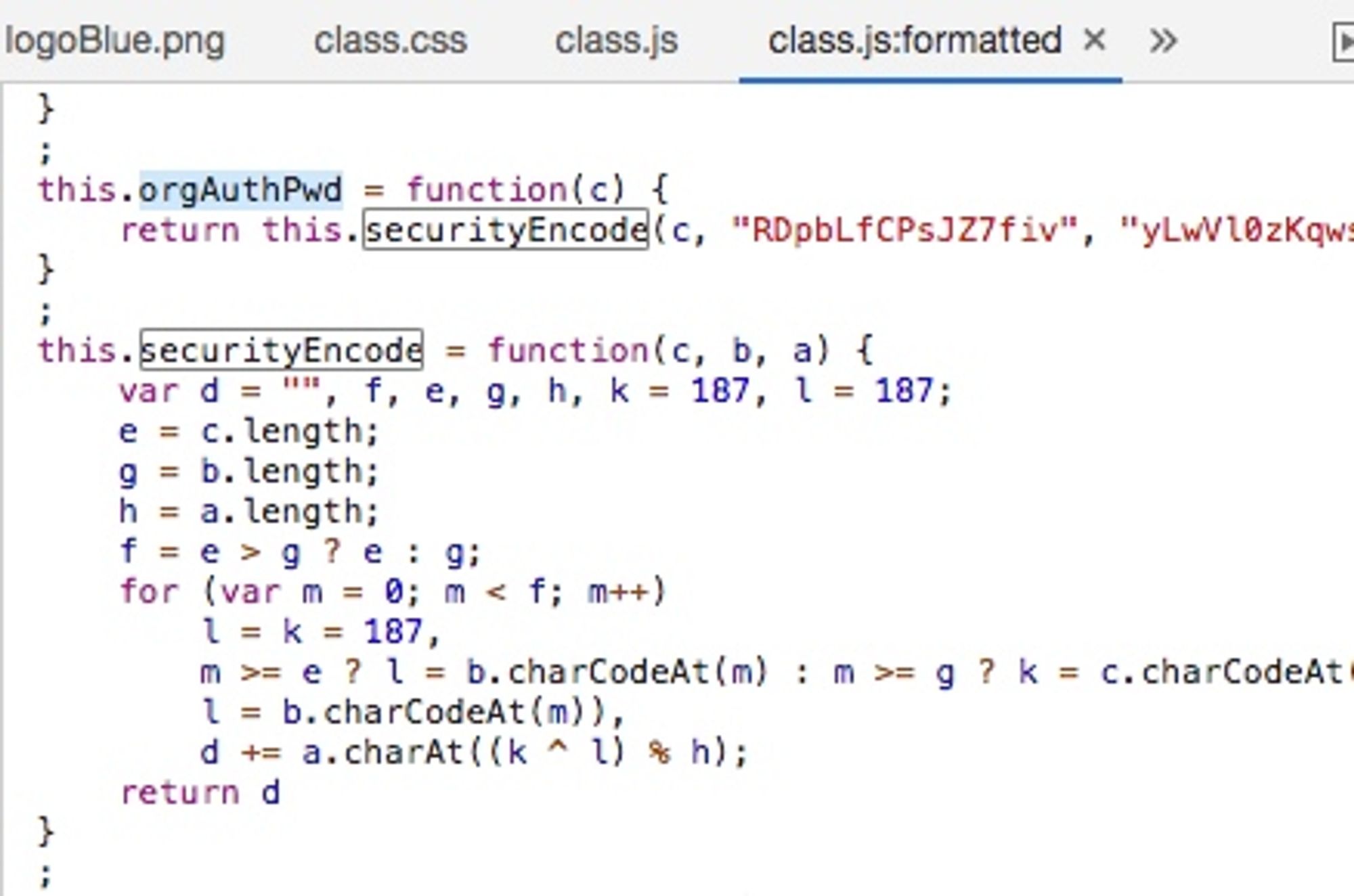
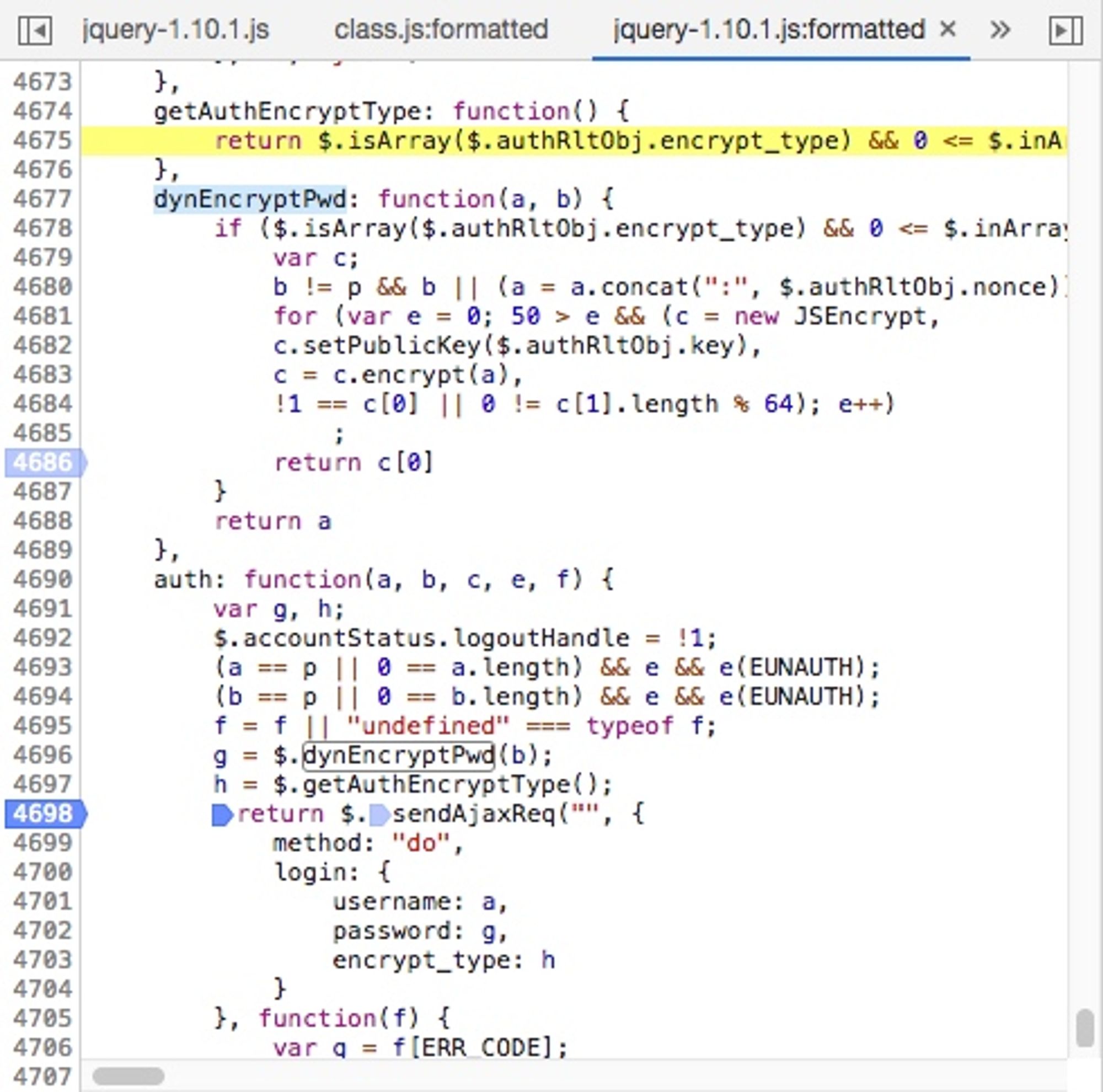
</code>RTSP 640x480 URL: <code class="notion-inline-code">rtsp://admin:pass@192.168.2.x:554/stream2</code></div><h3 class="notion-h notion-h2 notion-h-indent-0 notion-block-a9790019654f43bb91018b999abcb7f9" data-id="a9790019654f43bb91018b999abcb7f9"><span><div id="a9790019654f43bb91018b999abcb7f9" class="notion-header-anchor"></div><a class="notion-hash-link" href="#a9790019654f43bb91018b999abcb7f9" title="PTZ / Pan-Tilt-Zoom Control"><svg viewBox="0 0 16 16" width="16" height="16"><path fill-rule="evenodd" d="M7.775 3.275a.75.75 0 001.06 1.06l1.25-1.25a2 2 0 112.83 2.83l-2.5 2.5a2 2 0 01-2.83 0 .75.75 0 00-1.06 1.06 3.5 3.5 0 004.95 0l2.5-2.5a3.5 3.5 0 00-4.95-4.95l-1.25 1.25zm-4.69 9.64a2 2 0 010-2.83l2.5-2.5a2 2 0 012.83 0 .75.75 0 001.06-1.06 3.5 3.5 0 00-4.95 0l-2.5 2.5a3.5 3.5 0 004.95 4.95l1.25-1.25a.75.75 0 00-1.06-1.06l-1.25 1.25a2 2 0 01-2.83 0z"></path></svg></a><span class="notion-h-title">PTZ / Pan-Tilt-Zoom Control</span></span></h3><div class="notion-text notion-block-df9b7462f8ca47688c93ff072f7fce54">After integrating with HomeAssistant and DSM Surveillance Station, I realized that <b>PTZ control was not working</b>. It seems that the claim of ONVIF support only applies to recording.</div><div class="notion-text notion-block-d471240c454f4a0db092da213b37364b">The rest of this article focuses on how to control the PTZ function.</div><h4 class="notion-h notion-h3 notion-h-indent-1 notion-block-bdd8edf691d64b96af2524ead55e7899" data-id="bdd8edf691d64b96af2524ead55e7899"><span><div id="bdd8edf691d64b96af2524ead55e7899" class="notion-header-anchor"></div><a class="notion-hash-link" href="#bdd8edf691d64b96af2524ead55e7899" title="Capturing Packets"><svg viewBox="0 0 16 16" width="16" height="16"><path fill-rule="evenodd" d="M7.775 3.275a.75.75 0 001.06 1.06l1.25-1.25a2 2 0 112.83 2.83l-2.5 2.5a2 2 0 01-2.83 0 .75.75 0 00-1.06 1.06 3.5 3.5 0 004.95 0l2.5-2.5a3.5 3.5 0 00-4.95-4.95l-1.25 1.25zm-4.69 9.64a2 2 0 010-2.83l2.5-2.5a2 2 0 012.83 0 .75.75 0 001.06-1.06 3.5 3.5 0 00-4.95 0l-2.5 2.5a3.5 3.5 0 004.95 4.95l1.25-1.25a.75.75 0 00-1.06-1.06l-1.25 1.25a2 2 0 01-2.83 0z"></path></svg></a><span class="notion-h-title">Capturing Packets</span></span></h4><div class="notion-text notion-block-ce2d8d170316476d8e43f57f4c35bb88">I tried capturing packets using Charles, but the application didn&#x27;t go through the configured proxy.</div><h4 class="notion-h notion-h3 notion-h-indent-1 notion-block-3340b55af3d64152b754225c7564f9d3" data-id="3340b55af3d64152b754225c7564f9d3"><span><div id="3340b55af3d64152b754225c7564f9d3" class="notion-header-anchor"></div><a class="notion-hash-link" href="#3340b55af3d64152b754225c7564f9d3" title="Decompiling the Android App"><svg viewBox="0 0 16 16" width="16" height="16"><path fill-rule="evenodd" d="M7.775 3.275a.75.75 0 001.06 1.06l1.25-1.25a2 2 0 112.83 2.83l-2.5 2.5a2 2 0 01-2.83 0 .75.75 0 00-1.06 1.06 3.5 3.5 0 004.95 0l2.5-2.5a3.5 3.5 0 00-4.95-4.95l-1.25 1.25zm-4.69 9.64a2 2 0 010-2.83l2.5-2.5a2 2 0 012.83 0 .75.75 0 001.06-1.06 3.5 3.5 0 00-4.95 0l-2.5 2.5a3.5 3.5 0 004.95 4.95l1.25-1.25a.75.75 0 00-1.06-1.06l-1.25 1.25a2 2 0 01-2.83 0z"></path></svg></a><span class="notion-h-title">Decompiling the Android App</span></span></h4><div class="notion-text notion-block-d194752508d742d88f1282c91dfec504">After unsuccessful attempts to capture packets using Charles, I tried decompiling the <a target="_blank" rel="noopener noreferrer" class="notion-link" href="http://service.mercurycom.com.cn/download-891.html">Mercury Security App</a>. To my surprise, I found a lot of code related to <code class="notion-inline-code">com.tplink.ipc</code>, indicating that Mercury is indeed a sibling of TP-Link. The app is obfuscated, which makes it challenging to analyze.</div><ul class="notion-list notion-list-disc notion-block-7a7220b00556496687ed2be49bd7ce10"><li>Adding Local LAN Devices: <code class="notion-inline-code">com.tplink.ipc.ui.device.add.DeviceAddByDeviceDetailInputFragment</code></li></ul><ul class="notion-list notion-list-disc notion-block-0445c1afe4924a508f0ac71434816a83"><li>Login: <code class="notion-inline-code">com.tplink.ipc.ui.device.add.DeviceAddByDeviceDetailInputFragment#xcom.tplink.ipc.core.IPCAppContext#devReqAddDevice(java.lang.String, int, java.lang.String, java.lang.String, int, int)</code>. The <code class="notion-inline-code">devReqAddDevice</code> method calls a native function, and the actual implementation is found in <code class="notion-inline-code">libIPCAppContextJNI.so</code>. It seems that the network requests are made within the JNI code, making it difficult to capture them using Charles. Decompiling the <code class="notion-inline-code">.so</code> library is not worth the effort, so let&#x27;s try a different approach.</li></ul><h4 class="notion-h notion-h3 notion-h-indent-1 notion-block-a69d7b42ae2c4660a7cd904ccc7287c3" data-id="a69d7b42ae2c4660a7cd904ccc7287c3"><span><div id="a69d7b42ae2c4660a7cd904ccc7287c3" class="notion-header-anchor"></div><a class="notion-hash-link" href="#a69d7b42ae2c4660a7cd904ccc7287c3" title="WireShark iOS Packet Capture"><svg viewBox="0 0 16 16" width="16" height="16"><path fill-rule="evenodd" d="M7.775 3.275a.75.75 0 001.06 1.06l1.25-1.25a2 2 0 112.83 2.83l-2.5 2.5a2 2 0 01-2.83 0 .75.75 0 00-1.06 1.06 3.5 3.5 0 004.95 0l2.5-2.5a3.5 3.5 0 00-4.95-4.95l-1.25 1.25zm-4.69 9.64a2 2 0 010-2.83l2.5-2.5a2 2 0 012.83 0 .75.75 0 001.06-1.06 3.5 3.5 0 00-4.95 0l-2.5 2.5a3.5 3.5 0 004.95 4.95l1.25-1.25a.75.75 0 00-1.06-1.06l-1.25 1.25a2 2 0 01-2.83 0z"></path></svg></a><span class="notion-h-title">WireShark iOS Packet Capture</span></span></h4><div class="notion-text notion-block-0bb42284ff674e3ea40b2bb8c6bcf84c">Using <code class="notion-inline-code">rvictl</code>, I can also capture packets over 3G/4G connections, which is useful for capturing packets related to issues that only occur in a 4G environment. Additionally, for devices that do not support setting up a proxy, I can enable the iPhone&#x27;s personal hotspot and capture packets that way.</div><div class="notion-text notion-block-2c730613a85c4426906459f7871bfc1e">To capture packets, run the following command:</div><div class="notion-text notion-block-e3c3f1a20caa4579bd551f1eaf5f6d6c"><code class="notion-inline-code">rvictl -s 0000xxxx-00xxxxxxxxxxxxxx</code></div><div class="notion-text notion-block-40400e6a7b104be897342eee17a74c45">I discovered the network requests for the login and PTZ control steps:</div><h4 class="notion-h notion-h3 notion-h-indent-1 notion-block-97d9f51d8f624b9387ae1252f2203700" data-id="97d9f51d8f624b9387ae1252f2203700"><span><div id="97d9f51d8f624b9387ae1252f2203700" class="notion-header-anchor"></div><a class="notion-hash-link" href="#97d9f51d8f624b9387ae1252f2203700" title="Login"><svg viewBox="0 0 16 16" width="16" height="16"><path fill-rule="evenodd" d="M7.775 3.275a.75.75 0 001.06 1.06l1.25-1.25a2 2 0 112.83 2.83l-2.5 2.5a2 2 0 01-2.83 0 .75.75 0 00-1.06 1.06 3.5 3.5 0 004.95 0l2.5-2.5a3.5 3.5 0 00-4.95-4.95l-1.25 1.25zm-4.69 9.64a2 2 0 010-2.83l2.5-2.5a2 2 0 012.83 0 .75.75 0 001.06-1.06 3.5 3.5 0 00-4.95 0l-2.5 2.5a3.5 3.5 0 004.95 4.95l1.25-1.25a.75.75 0 00-1.06-1.06l-1.25 1.25a2 2 0 01-2.83 0z"></path></svg></a><span class="notion-h-title">Login</span></span></h4><div class="notion-text notion-block-bb4fd3305b8946e38d9b0ae9e53d1e91">Retrieve <code class="notion-inline-code">stok</code>:</div><h4 class="notion-h notion-h3 notion-h-indent-1 notion-block-d160a11b90bb42f98d412da303d5630c" data-id="d160a11b90bb42f98d412da303d5630c"><span><div id="d160a11b90bb42f98d412da303d5630c" class="notion-header-anchor"></div><a class="notion-hash-link" href="#d160a11b90bb42f98d412da303d5630c" title="Control"><svg viewBox="0 0 16 16" width="16" height="16"><path fill-rule="evenodd" d="M7.775 3.275a.75.75 0 001.06 1.06l1.25-1.25a2 2 0 112.83 2.83l-2.5 2.5a2 2 0 01-2.83 0 .75.75 0 00-1.06 1.06 3.5 3.5 0 004.95 0l2.5-2.5a3.5 3.5 0 00-4.95-4.95l-1.25 1.25zm-4.69 9.64a2 2 0 010-2.83l2.5-2.5a2 2 0 012.83 0 .75.75 0 001.06-1.06 3.5 3.5 0 00-4.95 0l-2.5 2.5a3.5 3.5 0 004.95 4.95l1.25-1.25a.75.75 0 00-1.06-1.06l-1.25 1.25a2 2 0 01-2.83 0z"></path></svg></a><span class="notion-h-title">Control</span></span></h4><div class="notion-text notion-block-1276b340204f459c8d77e57d4300f7b0">Use the obtained <code class="notion-inline-code">stok</code> to send POST requests:</div><h4 class="notion-h notion-h3 notion-h-indent-1 notion-block-5719ff090a4543d39528b2052d949856" data-id="5719ff090a4543d39528b2052d949856"><span><div id="5719ff090a4543d39528b2052d949856" class="notion-header-anchor"></div><a class="notion-hash-link" href="#5719ff090a4543d39528b2052d949856" title="Summary"><svg viewBox="0 0 16 16" width="16" height="16"><path fill-rule="evenodd" d="M7.775 3.275a.75.75 0 001.06 1.06l1.25-1.25a2 2 0 112.83 2.83l-2.5 2.5a2 2 0 01-2.83 0 .75.75 0 00-1.06 1.06 3.5 3.5 0 004.95 0l2.5-2.5a3.5 3.5 0 00-4.95-4.95l-1.25 1.25zm-4.69 9.64a2 2 0 010-2.83l2.5-2.5a2 2 0 012.83 0 .75.75 0 001.06-1.06 3.5 3.5 0 00-4.95 0l-2.5 2.5a3.5 3.5 0 004.95 4.95l1.25-1.25a.75.75 0 00-1.06-1.06l-1.25 1.25a2 2 0 01-2.83 0z"></path></svg></a><span class="notion-h-title">Summary</span></span></h4><div class="notion-text notion-block-7b5c5b8f6d0e4dae895fac48515e15b3">Currently, it seems that obtaining the <code class="notion-inline-code">stok</code> is the key to controlling the PTZ function. It can be obtained by capturing packets, but it seems to become invalid after the device restarts or after some time has passed (not confirmed).</div><h3 class="notion-h notion-h2 notion-h-indent-0 notion-block-a772f1bcb1364754b463ea9a3b83f14c" data-id="a772f1bcb1364754b463ea9a3b83f14c"><span><div id="a772f1bcb1364754b463ea9a3b83f14c" class="notion-header-anchor"></div><a class="notion-hash-link" href="#a772f1bcb1364754b463ea9a3b83f14c" title="Obtaining stok"><svg viewBox="0 0 16 16" width="16" height="16"><path fill-rule="evenodd" d="M7.775 3.275a.75.75 0 001.06 1.06l1.25-1.25a2 2 0 112.83 2.83l-2.5 2.5a2 2 0 01-2.83 0 .75.75 0 00-1.06 1.06 3.5 3.5 0 004.95 0l2.5-2.5a3.5 3.5 0 00-4.95-4.95l-1.25 1.25zm-4.69 9.64a2 2 0 010-2.83l2.5-2.5a2 2 0 012.83 0 .75.75 0 001.06-1.06 3.5 3.5 0 00-4.95 0l-2.5 2.5a3.5 3.5 0 004.95 4.95l1.25-1.25a.75.75 0 00-1.06-1.06l-1.25 1.25a2 2 0 01-2.83 0z"></path></svg></a><span class="notion-h-title">Obtaining <code class="notion-inline-code">stok</code></span></span></h3><div class="notion-text notion-block-5eb2bc0505a34c51bf5d64d4a57d7179">Although this camera has a web interface, it does not support PTZ control through the web. Therefore, in the initial packet capture, I did not consider the web interface. However, after analyzing the web interface, I found that the login verification process uses the same logic.</div><div class="notion-text notion-block-b22f93c7a4de4ce1b0c85a328d795bf0">Here are the steps:</div><ol start="1" class="notion-list notion-list-numbered notion-block-a3db1fdda7824790bfe9e07666d15702"><li>Retrieve the RSA public key and nonce (both change every time)</li></ol><ol start="2" class="notion-list notion-list-numbered notion-block-370a7ce5b92540448733053bbaef966c"><li>Encrypt the password <code class="notion-inline-code">password</code> as <code class="notion-inline-code">tpPassword</code> using TP-Link&#x27;s universal encryption method</li></ol><ol start="3" class="notion-list notion-list-numbered notion-block-66e3a4f3dcea4eefa14eb76a4ccbf23d"><li>Append <code class="notion-inline-code">:nonce</code> to <code class="notion-inline-code">tpPassword</code> as <code class="notion-inline-code">tpPassword:nonce</code></li></ol><ol start="4" class="notion-list notion-list-numbered notion-block-3708ec41069f41a1b003fd6b9cd03a2d"><li>Encrypt <code class="notion-inline-code">tpPassword:nonce</code> using the public key as <code class="notion-inline-code">rsaPassword</code></li></ol><ol start="5" class="notion-list notion-list-numbered notion-block-21021d9d760443bc856237fe37eda4cb"><li>Send <code class="notion-inline-code">rsaPassword</code> as the password for camera verification</li></ol><div class="notion-text notion-block-4d85b8c6f7ac482099bf2fbbbc078c6c">Regarding steps 2 and 3, here is the record:</div><h4 class="notion-h notion-h3 notion-h-indent-1 notion-block-160d6ee7ed7c41f69ea06228162edf91" data-id="160d6ee7ed7c41f69ea06228162edf91"><span><div id="160d6ee7ed7c41f69ea06228162edf91" class="notion-header-anchor"></div><a class="notion-hash-link" href="#160d6ee7ed7c41f69ea06228162edf91" title="Encrypting Password as tpPassword Using TP-Link Encryption"><svg viewBox="0 0 16 16" width="16" height="16"><path fill-rule="evenodd" d="M7.775 3.275a.75.75 0 001.06 1.06l1.25-1.25a2 2 0 112.83 2.83l-2.5 2.5a2 2 0 01-2.83 0 .75.75 0 00-1.06 1.06 3.5 3.5 0 004.95 0l2.5-2.5a3.5 3.5 0 00-4.95-4.95l-1.25 1.25zm-4.69 9.64a2 2 0 010-2.83l2.5-2.5a2 2 0 012.83 0 .75.75 0 001.06-1.06 3.5 3.5 0 00-4.95 0l-2.5 2.5a3.5 3.5 0 004.95 4.95l1.25-1.25a.75.75 0 00-1.06-1.06l-1.25 1.25a2 2 0 01-2.83 0z"></path></svg></a><span class="notion-h-title">Encrypting Password as <code class="notion-inline-code">tpPassword</code> Using TP-Link Encryption</span></span></h4><figure class="notion-asset-wrapper notion-asset-wrapper-image notion-block-2f64b1efc68f42f8b51700540fe55247"><div style="position:relative;display:flex;justify-content:center;align-self:center;width:438px;max-width:100%;flex-direction:column"><img style="object-fit:cover" src="https://www.notion.so/image/https%3A%2F%2Fblog.xiazhiri.com%2Fmedia%2F15639447250564.jpg?table=block&amp;id=2f64b1ef-c68f-42f8-b517-00540fe55247&amp;cache=v2" alt="notion image" loading="lazy" decoding="async"/></div></figure><div class="notion-text notion-block-0fcb17162dca4c60bb0f63bb4362e591">A search for &quot;RDpbLfCPsJZ7fiv&quot; reveals various implementations of this encryption method.</div><h4 class="notion-h notion-h3 notion-h-indent-1 notion-block-f573a122a5ee49c8887a59c6533e27bf" data-id="f573a122a5ee49c8887a59c6533e27bf"><span><div id="f573a122a5ee49c8887a59c6533e27bf" class="notion-header-anchor"></div><a class="notion-hash-link" href="#f573a122a5ee49c8887a59c6533e27bf" title="Encrypting tpPassword as rsaPassword Using RSA"><svg viewBox="0 0 16 16" width="16" height="16"><path fill-rule="evenodd" d="M7.775 3.275a.75.75 0 001.06 1.06l1.25-1.25a2 2 0 112.83 2.83l-2.5 2.5a2 2 0 01-2.83 0 .75.75 0 00-1.06 1.06 3.5 3.5 0 004.95 0l2.5-2.5a3.5 3.5 0 00-4.95-4.95l-1.25 1.25zm-4.69 9.64a2 2 0 010-2.83l2.5-2.5a2 2 0 012.83 0 .75.75 0 001.06-1.06 3.5 3.5 0 00-4.95 0l-2.5 2.5a3.5 3.5 0 004.95 4.95l1.25-1.25a.75.75 0 00-1.06-1.06l-1.25 1.25a2 2 0 01-2.83 0z"></path></svg></a><span class="notion-h-title">Encrypting <code class="notion-inline-code">tpPassword</code> as <code class="notion-inline-code">rsaPassword</code> Using RSA</span></span></h4><figure class="notion-asset-wrapper notion-asset-wrapper-image notion-block-a9b608d499084428b98ca1f51b79ff5f"><div style="position:relative;display:flex;justify-content:center;align-self:center;width:490px;max-width:100%;flex-direction:column"><img style="object-fit:cover" src="https://www.notion.so/image/https%3A%2F%2Fblog.xiazhiri.com%2Fmedia%2F15639465101232.jpg?table=block&amp;id=a9b608d4-9908-4428-b98c-a1f51b79ff5f&amp;cache=v2" alt="notion image" loading="lazy" decoding="async"/></div></figure><div class="notion-text notion-block-beef6d28bdc7465e800c27cefa9e771d">In the image, <code class="notion-inline-code">a = a.concat(&quot;:&quot;, $.authRltObj.nonce)</code> appends the nonce. <code class="notion-inline-code">c.setPublicKey($.authRltObj.key)</code> sets the public key. The subsequent <code class="notion-inline-code">sendAjaxReq</code> is thecontinuation of the process.</div><h3 class="notion-h notion-h2 notion-h-indent-0 notion-block-7cfb37c79a5c49e783004398398f9883" data-id="7cfb37c79a5c49e783004398398f9883"><span><div id="7cfb37c79a5c49e783004398398f9883" class="notion-header-anchor"></div><a class="notion-hash-link" href="#7cfb37c79a5c49e783004398398f9883" title="The Script"><svg viewBox="0 0 16 16" width="16" height="16"><path fill-rule="evenodd" d="M7.775 3.275a.75.75 0 001.06 1.06l1.25-1.25a2 2 0 112.83 2.83l-2.5 2.5a2 2 0 01-2.83 0 .75.75 0 00-1.06 1.06 3.5 3.5 0 004.95 0l2.5-2.5a3.5 3.5 0 00-4.95-4.95l-1.25 1.25zm-4.69 9.64a2 2 0 010-2.83l2.5-2.5a2 2 0 012.83 0 .75.75 0 001.06-1.06 3.5 3.5 0 00-4.95 0l-2.5 2.5a3.5 3.5 0 004.95 4.95l1.25-1.25a.75.75 0 00-1.06-1.06l-1.25 1.25a2 2 0 01-2.83 0z"></path></svg></a><span class="notion-h-title">The Script</span></span></h3><div class="notion-text notion-block-9239382de76d45c181978d21cb7db69b">Based on the analysis above, I have written a control script.</div><div class="notion-text notion-block-0fca0fb03d80416c9cedc1f598396a1b"><a target="_blank" rel="noopener noreferrer" class="notion-link" href="https://github.com/likaci/mercury-ipc-control">https://github.com/likaci/mercury-ipc-control</a></div></main>]]></content>
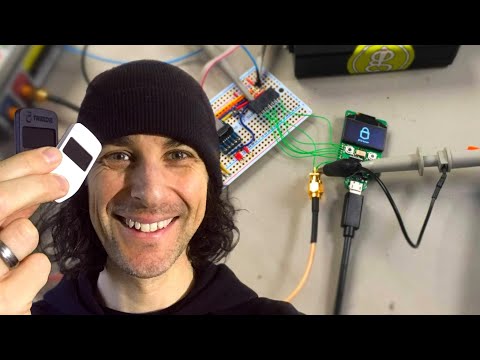
    </entry>
    <entry>
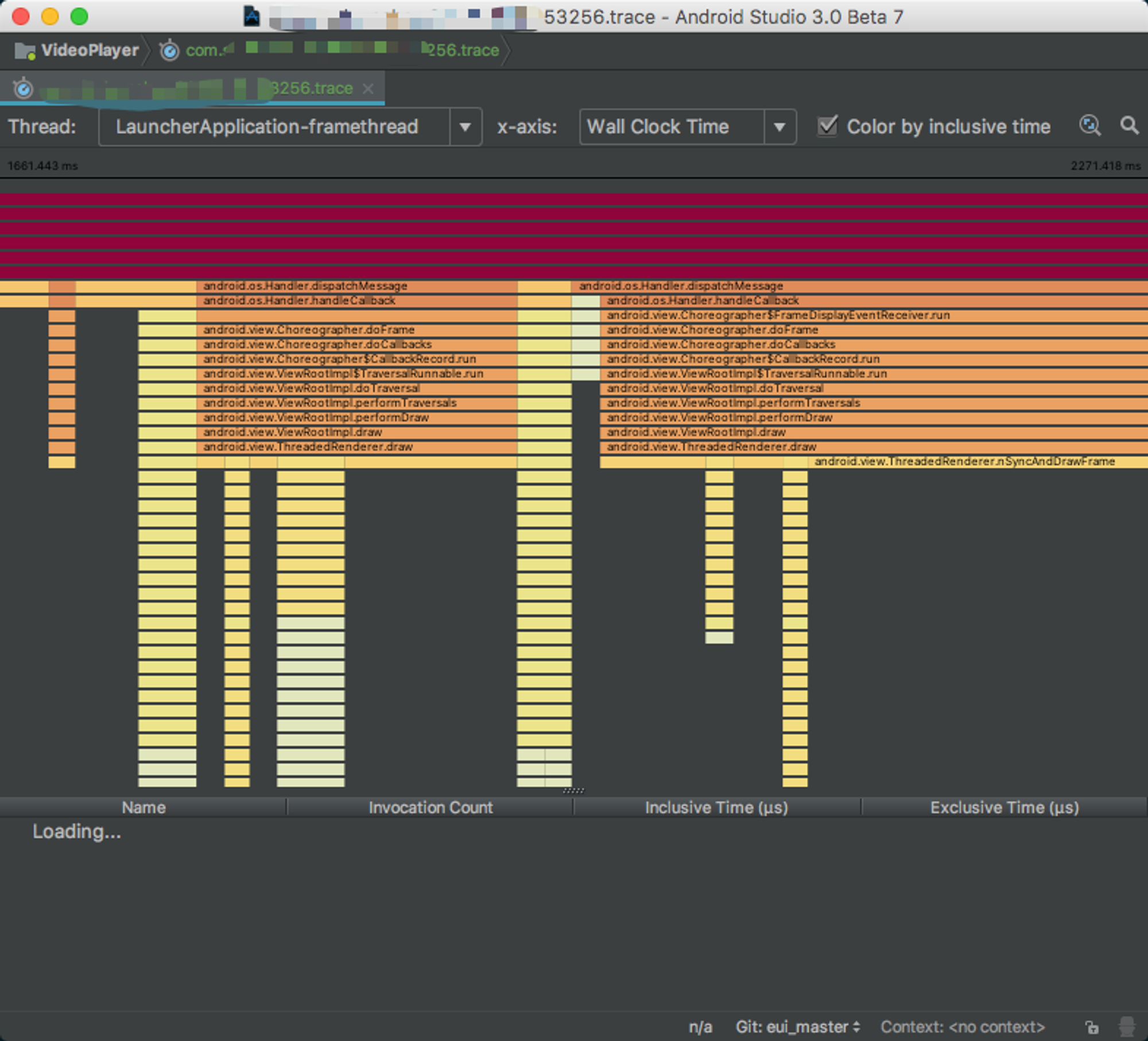
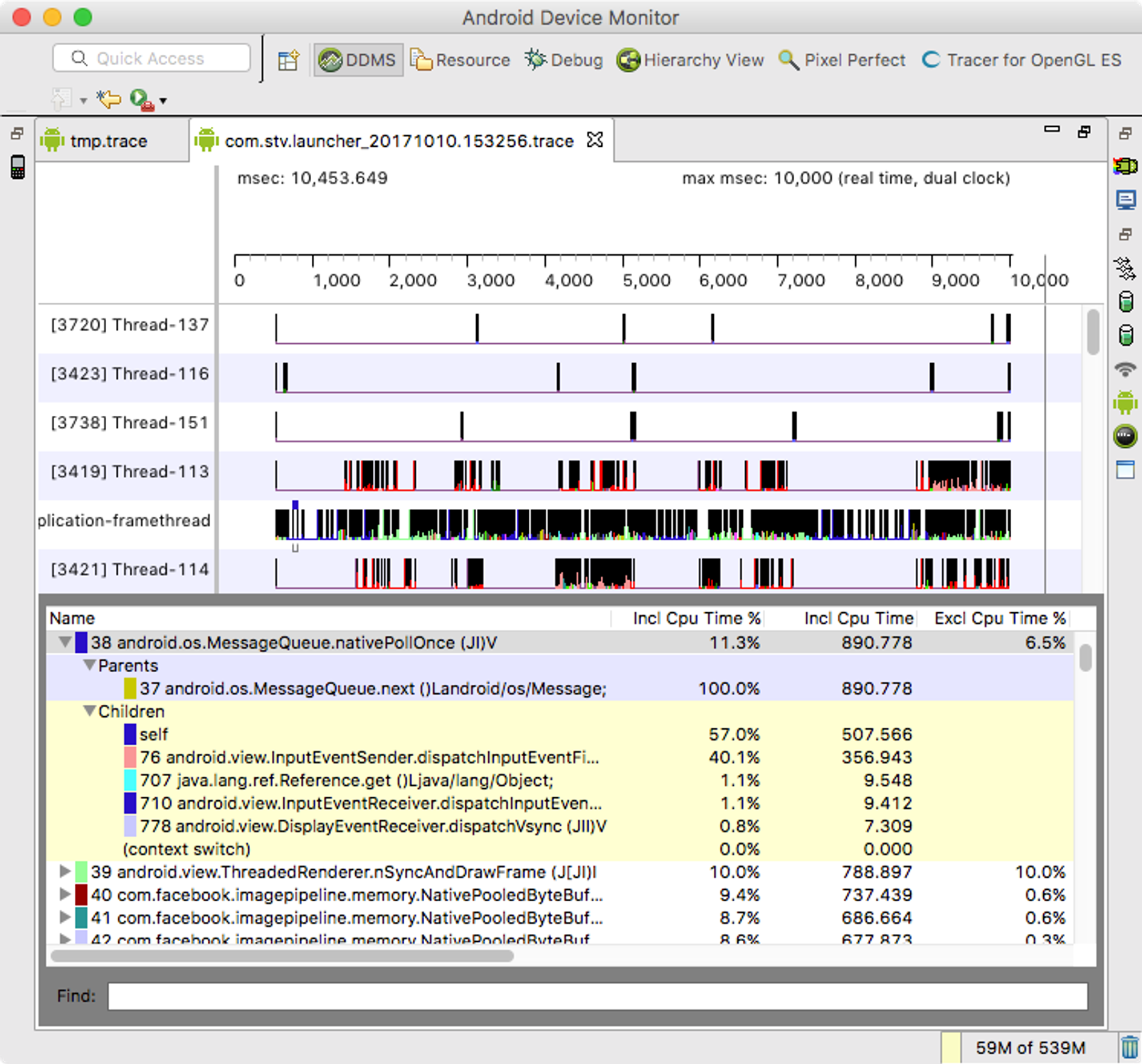
        <title type="html"><![CDATA[Android Method Trace Generation and Analysis]]></title>
        <id>https://www.xiazhiri.com/android-method-trace-generation-analysis</id>
        <link href="https://www.xiazhiri.com/android-method-trace-generation-analysis"/>
        <updated>2017-10-11T04:00:00.000Z</updated>
        <summary type="html"><![CDATA[Analyse the generation of Android method traces, including different methods to generate trace files. Write a command-line tools to run Android Method Trace on the fly.]]></summary>
        <content type="html"><![CDATA[<main class="notion light-mode notion-page notion-block-55d2b8bda0c8402889cf3eb2760fde78"><div class="notion-viewport"></div><div class="notion-collection-page-properties"></div><figure class="notion-asset-wrapper notion-asset-wrapper-image notion-block-a08a38ef8906437794fe3ba5b353b9ad"><div style="position:relative;display:flex;justify-content:center;align-self:center;width:480px;max-width:100%;flex-direction:column"><img style="object-fit:cover" src="https://www.notion.so/image/https%3A%2F%2Fblog.xiazhiri.com%2Fmedia%2Fandroid-studio-3.0-profiler.png?table=block&amp;id=a08a38ef-8906-4377-94fe-3ba5b353b9ad&amp;cache=v2" alt="notion image" loading="lazy" decoding="async"/></div></figure><div class="notion-text notion-block-7941f93d2a714580885e80d1abd67ab4">The Profiler tool in Android Studio 3.0 has made significant progress compared to the 2.0 version. I have reviewed the relevant source code and recorded the following information:</div><h4 class="notion-h notion-h3 notion-h-indent-0 notion-block-e9ffdfc691c34949b51b3f8fbbca8995" data-id="e9ffdfc691c34949b51b3f8fbbca8995"><span><div id="e9ffdfc691c34949b51b3f8fbbca8995" class="notion-header-anchor"></div><a class="notion-hash-link" href="#e9ffdfc691c34949b51b3f8fbbca8995" title="Generating Trace Files"><svg viewBox="0 0 16 16" width="16" height="16"><path fill-rule="evenodd" d="M7.775 3.275a.75.75 0 001.06 1.06l1.25-1.25a2 2 0 112.83 2.83l-2.5 2.5a2 2 0 01-2.83 0 .75.75 0 00-1.06 1.06 3.5 3.5 0 004.95 0l2.5-2.5a3.5 3.5 0 00-4.95-4.95l-1.25 1.25zm-4.69 9.64a2 2 0 010-2.83l2.5-2.5a2 2 0 012.83 0 .75.75 0 001.06-1.06 3.5 3.5 0 00-4.95 0l-2.5 2.5a3.5 3.5 0 004.95 4.95l1.25-1.25a.75.75 0 00-1.06-1.06l-1.25 1.25a2 2 0 01-2.83 0z"></path></svg></a><span class="notion-h-title">Generating Trace Files</span></span></h4><div class="notion-text notion-block-f177f92d10744af2bc90f320adceb490">There are two main ways to generate trace files as mentioned in the official documentation.</div><h4 class="notion-h notion-h3 notion-h-indent-0 notion-block-1547332891884ea5ae7128fd9ded9b57" data-id="1547332891884ea5ae7128fd9ded9b57"><span><div id="1547332891884ea5ae7128fd9ded9b57" class="notion-header-anchor"></div><a class="notion-hash-link" href="#1547332891884ea5ae7128fd9ded9b57" title="Code"><svg viewBox="0 0 16 16" width="16" height="16"><path fill-rule="evenodd" d="M7.775 3.275a.75.75 0 001.06 1.06l1.25-1.25a2 2 0 112.83 2.83l-2.5 2.5a2 2 0 01-2.83 0 .75.75 0 00-1.06 1.06 3.5 3.5 0 004.95 0l2.5-2.5a3.5 3.5 0 00-4.95-4.95l-1.25 1.25zm-4.69 9.64a2 2 0 010-2.83l2.5-2.5a2 2 0 012.83 0 .75.75 0 001.06-1.06 3.5 3.5 0 00-4.95 0l-2.5 2.5a3.5 3.5 0 004.95 4.95l1.25-1.25a.75.75 0 00-1.06-1.06l-1.25 1.25a2 2 0 01-2.83 0z"></path></svg></a><span class="notion-h-title">Code</span></span></h4><div class="notion-text notion-block-1337c1bb3c6044fabe93215e69183cc4">The first method involves adding code to your project:</div><div class="notion-text notion-block-d614e6634805472aaf51ac519c3588a2">This will generate the trace file.</div><h4 class="notion-h notion-h3 notion-h-indent-0 notion-block-0b8e2774f0d243d2b87f6a9c6307af2f" data-id="0b8e2774f0d243d2b87f6a9c6307af2f"><span><div id="0b8e2774f0d243d2b87f6a9c6307af2f" class="notion-header-anchor"></div><a class="notion-hash-link" href="#0b8e2774f0d243d2b87f6a9c6307af2f" title="ddmlib"><svg viewBox="0 0 16 16" width="16" height="16"><path fill-rule="evenodd" d="M7.775 3.275a.75.75 0 001.06 1.06l1.25-1.25a2 2 0 112.83 2.83l-2.5 2.5a2 2 0 01-2.83 0 .75.75 0 00-1.06 1.06 3.5 3.5 0 004.95 0l2.5-2.5a3.5 3.5 0 00-4.95-4.95l-1.25 1.25zm-4.69 9.64a2 2 0 010-2.83l2.5-2.5a2 2 0 012.83 0 .75.75 0 001.06-1.06 3.5 3.5 0 00-4.95 0l-2.5 2.5a3.5 3.5 0 004.95 4.95l1.25-1.25a.75.75 0 00-1.06-1.06l-1.25 1.25a2 2 0 01-2.83 0z"></path></svg></a><span class="notion-h-title">ddmlib</span></span></h4><div class="notion-text notion-block-1e57f4343b5c476fb0ba2e2eef442c4d">The second method involves using ddms/Android Monitor to manually generate the trace file. ddms relies on a library called ddmlib, which can be found in the Android SDK at tools/lib/ddmlib-*.jar.</div><div class="notion-text notion-block-833879d4014947969095c8ab6bef8114">There are not many articles available about ddmlib, but you can refer to the following resources: <a target="_blank" rel="noopener noreferrer" class="notion-link" href="http://blog.csdn.net/eclipsexys/article/details/51316423">Hidden Boss - Getting Started with ddmlib</a> and <a target="_blank" rel="noopener noreferrer" class="notion-link" href="https://testerhome.com/topics/2422">Using adb with ddmlib, Building Framework Libraries</a>.</div><h4 class="notion-h notion-h3 notion-h-indent-0 notion-block-4e9f040c668c41c3a35749635cc1562a" data-id="4e9f040c668c41c3a35749635cc1562a"><span><div id="4e9f040c668c41c3a35749635cc1562a" class="notion-header-anchor"></div><a class="notion-hash-link" href="#4e9f040c668c41c3a35749635cc1562a" title="Command-line Tool"><svg viewBox="0 0 16 16" width="16" height="16"><path fill-rule="evenodd" d="M7.775 3.275a.75.75 0 001.06 1.06l1.25-1.25a2 2 0 112.83 2.83l-2.5 2.5a2 2 0 01-2.83 0 .75.75 0 00-1.06 1.06 3.5 3.5 0 004.95 0l2.5-2.5a3.5 3.5 0 00-4.95-4.95l-1.25 1.25zm-4.69 9.64a2 2 0 010-2.83l2.5-2.5a2 2 0 012.83 0 .75.75 0 001.06-1.06 3.5 3.5 0 00-4.95 0l-2.5 2.5a3.5 3.5 0 004.95 4.95l1.25-1.25a.75.75 0 00-1.06-1.06l-1.25 1.25a2 2 0 01-2.83 0z"></path></svg></a><span class="notion-h-title">Command-line Tool</span></span></h4><div class="notion-text notion-block-f23f4654523249c2882498ce8c1a0f1d">While exploring the source code, I encountered numerous challenges and wrote a command-line tool called <a target="_blank" rel="noopener noreferrer" class="notion-link" href="https://github.com/likaci/AndroidMethodTraceRunner">AndroidMethodTraceRunner</a>.</div><div class="notion-text notion-block-7e107d5cd2e44689abb19997cfe13d4c">To use it, run the following command: <code class="notion-inline-code">$ java -jar mtr.jar -p com.your.package -o output.trace -t 10</code> to trace for 10 seconds. Please note that it requires Java 8 to run.</div><div class="notion-text notion-block-8429e7cfe9b0480caaca3742e367fe8f">There are two main issues to be aware of:</div><ol start="1" class="notion-list notion-list-numbered notion-block-f7bd1840d6fe4eaaa120cdd2107811c6"><li><code class="notion-inline-code">AndroidDebugBridge.init(true)</code> - If set to <code class="notion-inline-code">false</code>, the client cannot be accessed.</li></ol><ol start="2" class="notion-list notion-list-numbered notion-block-5f423055d8bc4567983ef5755c272ba0"><li>You must close ddms and the Studio monitor/profiler, otherwise, they will preempt the client and cause a connection failure.</li></ol><div class="notion-text notion-block-b3e2fdc2e1ed460a8dd5e0eea0407033">Here are a few key concepts related to ddmlib:</div><ul class="notion-list notion-list-disc notion-block-1aa001d809a44ed6b058166aa347b835"><li>Bridge - adb</li></ul><ul class="notion-list notion-list-disc notion-block-f0ddef237cd543eb9b5b9656703f3130"><li>Device - the connected device</li></ul><ul class="notion-list notion-list-disc notion-block-e6d8642b47d043b6b6d2a907a35ea30a"><li>Client - the application</li></ul><div class="notion-text notion-block-88012e25e8dd438eaea0595b943fd07a">The main code snippet is as follows:</div><h4 class="notion-h notion-h3 notion-h-indent-0 notion-block-1e31de92dd264ec8b91d828abf580bd6" data-id="1e31de92dd264ec8b91d828abf580bd6"><span><div id="1e31de92dd264ec8b91d828abf580bd6" class="notion-header-anchor"></div><a class="notion-hash-link" href="#1e31de92dd264ec8b91d828abf580bd6" title="Android Studio"><svg viewBox="0 0 16 16" width="16" height="16"><path fill-rule="evenodd" d="M7.775 3.275a.75.75 0 001.06 1.06l1.25-1.25a2 2 0 112.83 2.83l-2.5 2.5a2 2 0 01-2.83 0 .75.75 0 00-1.06 1.06 3.5 3.5 0 004.95 0l2.5-2.5a3.5 3.5 0 00-4.95-4.95l-1.25 1.25zm-4.69 9.64a2 2 0 010-2.83l2.5-2.5a2 2 0 012.83 0 .75.75 0 001.06-1.06 3.5 3.5 0 00-4.95 0l-2.5 2.5a3.5 3.5 0 004.95 4.95l1.25-1.25a.75.75 0 00-1.06-1.06l-1.25 1.25a2 2 0 01-2.83 0z"></path></svg></a><span class="notion-h-title">Android Studio</span></span></h4><div class="notion-text notion-block-238633664d374972847949637cd97215">However, Android Studio 3.0 does not use ddmlib.</div><div class="notion-text notion-block-fd1ff26bd6bb48e3b667c75886724f18">The general call stack is as follows:</div><h4 class="notion-h notion-h3 notion-h-indent-0 notion-block-3127e591b7ca4274ac8d6ec43e2ee09b" data-id="3127e591b7ca4274ac8d6ec43e2ee09b"><span><div id="3127e591b7ca4274ac8d6ec43e2ee09b" class="notion-header-anchor"></div><a class="notion-hash-link" href="#3127e591b7ca4274ac8d6ec43e2ee09b" title="Trace Parsing/Reading"><svg viewBox="0 0 16 16" width="16" height="16"><path fill-rule="evenodd" d="M7.775 3.275a.75.75 0 001.06 1.06l1.25-1.25a2 2 0 112.83 2.83l-2.5 2.5a2 2 0 01-2.83 0 .75.75 0 00-1.06 1.06 3.5 3.5 0 004.95 0l2.5-2.5a3.5 3.5 0 00-4.95-4.95l-1.25 1.25zm-4.69 9.64a2 2 0 010-2.83l2.5-2.5a2 2 0 012.83 0 .75.75 0 001.06-1.06 3.5 3.5 0 00-4.95 0l-2.5 2.5a3.5 3.5 0 004.95 4.95l1.25-1.25a.75.75 0 00-1.06-1.06l-1.25 1.25a2 2 0 01-2.83 0z"></path></svg></a><span class="notion-h-title">Trace Parsing/Reading</span></span></h4><h4 class="notion-h notion-h3 notion-h-indent-0 notion-block-d3762a5c96c44050a28459830d029188" data-id="d3762a5c96c44050a28459830d029188"><span><div id="d3762a5c96c44050a28459830d029188" class="notion-header-anchor"></div><a class="notion-hash-link" href="#d3762a5c96c44050a28459830d029188" title="GUI"><svg viewBox="0 0 16 16" width="16" height="16"><path fill-rule="evenodd" d="M7.775 3.275a.75.75 0 001.06 1.06l1.25-1.25a2 2 0 112.83 2.83l-2.5 2.5a2 2 0 01-2.83 0 .75.75 0 00-1.06 1.06 3.5 3.5 0 004.95 0l2.5-2.5a3.5 3.5 0 00-4.95-4.95l-1.25 1.25zm-4.69 9.64a2 2 0 010-2.83l2.5-2.5a2 2 0 012.83 0 .75.75 0 001.06-1.06 3.5 3.5 0 00-4.95 0l-2.5 2.5a3.5 3.5 0 004.95 4.95l1.25-1.25a.75.75 0 00-1.06-1.06l-1.25 1.25a2 2 0 01-2.83 0z"></path></svg></a><span class="notion-h-title">GUI</span></span></h4><div class="notion-text notion-block-9058195bab1248559a9c1163294ab38b">ddms or Android Studio 2.0/IntelliJ IDEA can directly open trace files, but they are not as user-friendly as the profiler in Android Studio 3.0.</div><figure class="notion-asset-wrapper notion-asset-wrapper-image notion-block-48ff5a7d28b14767ae8ed88a6048e5bb"><div style="position:relative;display:flex;justify-content:center;align-self:center;width:700px;max-width:100%;flex-direction:column"><img style="object-fit:cover" src="https://www.notion.so/image/https%3A%2F%2Fblog.xiazhiri.com%2Fmedia%2Fandroid-studio-traceview.png?table=block&amp;id=48ff5a7d-28b1-4767-ae8e-d88a6048e5bb&amp;cache=v2" alt="notion image" loading="lazy" decoding="async"/></div></figure><figure class="notion-asset-wrapper notion-asset-wrapper-image notion-block-7ba2e378611a4897966f2383a0ef71c8"><div style="position:relative;display:flex;justify-content:center;align-self:center;width:700px;max-width:100%;flex-direction:column"><img style="object-fit:cover" src="https://www.notion.so/image/https%3A%2F%2Fblog.xiazhiri.com%2Fmedia%2Fmonitor.png?table=block&amp;id=7ba2e378-611a-4897-966f-2383a0ef71c8&amp;cache=v2" alt="notion image" loading="lazy" decoding="async"/></div></figure><h3 class="notion-h notion-h2 notion-h-indent-0 notion-block-567c30f0a3664212935d9997df6d91b8" data-id="567c30f0a3664212935d9997df6d91b8"><span><div id="567c30f0a3664212935d9997df6d91b8" class="notion-header-anchor"></div><a class="notion-hash-link" href="#567c30f0a3664212935d9997df6d91b8" title="Command Line Tool"><svg viewBox="0 0 16 16" width="16" height="16"><path fill-rule="evenodd" d="M7.775 3.275a.75.75 0 001.06 1.06l1.25-1.25a2 2 0 112.83 2.83l-2.5 2.5a2 2 0 01-2.83 0 .75.75 0 00-1.06 1.06 3.5 3.5 0 004.95 0l2.5-2.5a3.5 3.5 0 00-4.95-4.95l-1.25 1.25zm-4.69 9.64a2 2 0 010-2.83l2.5-2.5a2 2 0 012.83 0 .75.75 0 001.06-1.06 3.5 3.5 0 00-4.95 0l-2.5 2.5a3.5 3.5 0 004.95 4.95l1.25-1.25a.75.75 0 00-1.06-1.06l-1.25 1.25a2 2 0 01-2.83 0z"></path></svg></a><span class="notion-h-title">Command Line Tool</span></span></h3><div class="notion-text notion-block-24866af0a6504187afc8afe29f842985">Based on the above analysis I wrote a command line tool based on ddmlib to run Android Method Trace on the fly.</div><div class="notion-text notion-block-568ec66015cf49b58c29b25163ca5417"><a target="_blank" rel="noopener noreferrer" class="notion-link" href="https://github.com/likaci/AndroidMethodTraceRunner">https://github.com/likaci/AndroidMethodTraceRunner</a></div></main>]]></content>
    </entry>
    <entry>
        <title type="html"><![CDATA[Locate Android ARP storms with WireShark and strace]]></title>
        <id>https://www.xiazhiri.com/locate-android-arp-storms-with-wireshark-and-strace</id>
        <link href="https://www.xiazhiri.com/locate-android-arp-storms-with-wireshark-and-strace"/>
        <updated>2017-09-30T04:00:00.000Z</updated>
        <content type="html"><![CDATA[<main class="notion light-mode notion-page notion-block-ba85a883a0bb41b297086dea03a50cb3"><div class="notion-viewport"></div><div class="notion-collection-page-properties"></div><div class="notion-text notion-block-deb56a409e5e42f1a98ada63bcf07d70">In the past few days, some users have been complaining about Android TV sending a lot of ARP packets. The user use Wireshark to grab packets and found that the TV sends 1000 arp packets in a minute, but can&#x27;t locate the specific app.</div><div class="notion-text notion-block-13d2aaa5fc324e9282167c5032a841d7">Finally, use <code class="notion-inline-code">strace -f -p PID | grep sendto</code> and wireshark to locate the process</div><figure class="notion-asset-wrapper notion-asset-wrapper-image notion-block-c03e2cb5b1bb4305bd172980cf284e3c"><div style="position:relative;display:flex;justify-content:center;align-self:center;width:100%;max-width:100%;flex-direction:column"><img style="object-fit:cover" src="https://www.notion.so/image/https%3A%2F%2Fblog.xiazhiri.com%2Fmedia%2Fandroid-arp-wireshark.png?table=block&amp;id=c03e2cb5-b1bb-4305-bd17-2980cf284e3c&amp;cache=v2" alt="notion image" loading="lazy" decoding="async"/></div></figure><div class="notion-blank notion-block-7af7b4c4684143168b8d414c4132a8c4"> </div></main>]]></content>
    </entry>
    <entry>
        <title type="html"><![CDATA[Lint Aosp App With SonarQube]]></title>
        <id>https://www.xiazhiri.com/lint-aosp-app-with-sonarqube</id>
        <link href="https://www.xiazhiri.com/lint-aosp-app-with-sonarqube"/>
        <updated>2017-06-06T04:00:00.000Z</updated>
        <summary type="html"><![CDATA[fix SonarQube lint error on AOSP App]]></summary>
        <content type="html"><![CDATA[<main class="notion light-mode notion-page notion-block-8a7681da2dda4ca48e072e5a3326b392"><div class="notion-viewport"></div><div class="notion-collection-page-properties"></div><h4 class="notion-h notion-h3 notion-h-indent-0 notion-block-8b70b0573b534207a791fc8dff9fbf31" data-id="8b70b0573b534207a791fc8dff9fbf31"><span><div id="8b70b0573b534207a791fc8dff9fbf31" class="notion-header-anchor"></div><a class="notion-hash-link" href="#8b70b0573b534207a791fc8dff9fbf31" title="Background"><svg viewBox="0 0 16 16" width="16" height="16"><path fill-rule="evenodd" d="M7.775 3.275a.75.75 0 001.06 1.06l1.25-1.25a2 2 0 112.83 2.83l-2.5 2.5a2 2 0 01-2.83 0 .75.75 0 00-1.06 1.06 3.5 3.5 0 004.95 0l2.5-2.5a3.5 3.5 0 00-4.95-4.95l-1.25 1.25zm-4.69 9.64a2 2 0 010-2.83l2.5-2.5a2 2 0 012.83 0 .75.75 0 001.06-1.06 3.5 3.5 0 00-4.95 0l-2.5 2.5a3.5 3.5 0 004.95 4.95l1.25-1.25a.75.75 0 00-1.06-1.06l-1.25 1.25a2 2 0 01-2.83 0z"></path></svg></a><span class="notion-h-title">Background</span></span></h4><div class="notion-text notion-block-c7610b7136104d6eb1a8c64559e18672">Third-party apps can directly use Lint to display results in Android Studio.
When compiling the source code, running <code class="notion-inline-code">lint packages/apps/Calendar/</code> in the project root directory after &quot;make&quot; can also lint.
However, when actually using <code class="notion-inline-code">lint vendor/letv/apps/Camera/</code>, it prompts <code class="notion-inline-code">No bytecode found: Has the project been built? (Camera)</code>, and there are also false positives for resource usage.</div><h4 class="notion-h notion-h3 notion-h-indent-0 notion-block-6d7432112fc1422c9fe56252b2565b5b" data-id="6d7432112fc1422c9fe56252b2565b5b"><span><div id="6d7432112fc1422c9fe56252b2565b5b" class="notion-header-anchor"></div><a class="notion-hash-link" href="#6d7432112fc1422c9fe56252b2565b5b" title="Cause"><svg viewBox="0 0 16 16" width="16" height="16"><path fill-rule="evenodd" d="M7.775 3.275a.75.75 0 001.06 1.06l1.25-1.25a2 2 0 112.83 2.83l-2.5 2.5a2 2 0 01-2.83 0 .75.75 0 00-1.06 1.06 3.5 3.5 0 004.95 0l2.5-2.5a3.5 3.5 0 00-4.95-4.95l-1.25 1.25zm-4.69 9.64a2 2 0 010-2.83l2.5-2.5a2 2 0 012.83 0 .75.75 0 001.06-1.06 3.5 3.5 0 00-4.95 0l-2.5 2.5a3.5 3.5 0 004.95 4.95l1.25-1.25a.75.75 0 00-1.06-1.06l-1.25 1.25a2 2 0 01-2.83 0z"></path></svg></a><span class="notion-h-title">Cause</span></span></h4><div class="notion-text notion-block-2e1f8db8a1ca477cada1c8561b3111fd">Analyzing the lint source code reveals that</div><div class="notion-text notion-block-1749fd6241ed48eeb75105549c65556e"><a target="_blank" rel="noopener noreferrer" class="notion-link" href="https://android.googlesource.com/platform/sdk/+/0bf1b2c/lint/libs/lint_api/src/com/android/tools/lint/detector/api/Project.java#654">lint/detector/api/Project.java#654</a></div><div class="notion-text notion-block-b65300db70034fe2b66ae4d594255dcf">Lint will try to find <code class="notion-inline-code">ModuleName_intermediates/classes.jar</code> in the out directory. If it cannot be found, it will report &quot;No bytecode found&quot;.</div><div class="notion-text notion-block-338e09bd3e354efaa187e07dc1bd9d33">For example, <code class="notion-inline-code">/letv/workspace/DEMETER_FINAL/out/target/common/obj/APPS/StvCamera_intermediates</code></div><div class="notion-text notion-block-42fcbdea023c49958374344dbd384225">However, there are two reasons for not finding it:</div><ol start="1" class="notion-list notion-list-numbered notion-block-7b4e6bd744d542c29b0741ba4035b21b"><li>Starting from Android M, AOSP uses Jack for compilation (JaCoCo starting from Android N?), and classes.jar is not generated during Jack compilation. Instead, classes.jack / classes.dex are generated.</li></ol><ol start="2" class="notion-list notion-list-numbered notion-block-b0b6905d6c4a400ba1b4c00d2279f465"><li>In the getIntermediateDirs() method, moduleName = mDir.getName() instead of LOCAL_PACKAGE_NAME specified in vendor/letv/app/**/Android.mk</li></ol><h4 class="notion-h notion-h3 notion-h-indent-0 notion-block-d64d1d9da8264d189fc2f9568bdeff01" data-id="d64d1d9da8264d189fc2f9568bdeff01"><span><div id="d64d1d9da8264d189fc2f9568bdeff01" class="notion-header-anchor"></div><a class="notion-hash-link" href="#d64d1d9da8264d189fc2f9568bdeff01" title="Disabling Jack / dex2jar"><svg viewBox="0 0 16 16" width="16" height="16"><path fill-rule="evenodd" d="M7.775 3.275a.75.75 0 001.06 1.06l1.25-1.25a2 2 0 112.83 2.83l-2.5 2.5a2 2 0 01-2.83 0 .75.75 0 00-1.06 1.06 3.5 3.5 0 004.95 0l2.5-2.5a3.5 3.5 0 00-4.95-4.95l-1.25 1.25zm-4.69 9.64a2 2 0 010-2.83l2.5-2.5a2 2 0 012.83 0 .75.75 0 001.06-1.06 3.5 3.5 0 00-4.95 0l-2.5 2.5a3.5 3.5 0 004.95 4.95l1.25-1.25a.75.75 0 00-1.06-1.06l-1.25 1.25a2 2 0 01-2.83 0z"></path></svg></a><span class="notion-h-title">Disabling Jack / dex2jar</span></span></h4><div class="notion-text notion-block-ff4849e4cf9645e2a45be1db3b2bce13">For problem 1, either disable Jack to prevent the generation of classed.jar during make, or convert classes.dex to classes.jar.</div><div class="notion-text notion-block-21b48e147305484b9856e24a152c25cd">Disabling Jack for the entire project will cause make to fail. Disabling at the module level has been tried, but it does not work.</div><div class="notion-text notion-block-71178858139c41f498832a6c3dd22e2e">Testing dex2jar is feasible.</div><h4 class="notion-h notion-h3 notion-h-indent-0 notion-block-5bd19d39574c41b588c92fb8bede9d6f" data-id="5bd19d39574c41b588c92fb8bede9d6f"><span><div id="5bd19d39574c41b588c92fb8bede9d6f" class="notion-header-anchor"></div><a class="notion-hash-link" href="#5bd19d39574c41b588c92fb8bede9d6f" title="Modifying lint-api.jar"><svg viewBox="0 0 16 16" width="16" height="16"><path fill-rule="evenodd" d="M7.775 3.275a.75.75 0 001.06 1.06l1.25-1.25a2 2 0 112.83 2.83l-2.5 2.5a2 2 0 01-2.83 0 .75.75 0 00-1.06 1.06 3.5 3.5 0 004.95 0l2.5-2.5a3.5 3.5 0 00-4.95-4.95l-1.25 1.25zm-4.69 9.64a2 2 0 010-2.83l2.5-2.5a2 2 0 012.83 0 .75.75 0 001.06-1.06 3.5 3.5 0 00-4.95 0l-2.5 2.5a3.5 3.5 0 004.95 4.95l1.25-1.25a.75.75 0 00-1.06-1.06l-1.25 1.25a2 2 0 01-2.83 0z"></path></svg></a><span class="notion-h-title">Modifying lint-api.jar</span></span></h4><div class="notion-text notion-block-79edc63525d24e40b905245339ba2b8d">For problem 2, modifying lint-api.jar is simpler than compiling the entire lint tool. The method is similar to modifying CrossWalk.jar.</div><div class="notion-text notion-block-79bf0b418bee4e5c978464dcf65993ba">The modification process is described in <a target="_blank" rel="noopener noreferrer" class="notion-link" href="https://github.com/likaci/android-lint-mod-jar/commits/master">https://github.com/likaci/android-lint-mod-jar/commits/master</a></div><div class="notion-text notion-block-28eaa962ece84ace8e72b33c57ece51e">In addition, the lint used in the source code environment is an older version from <code class="notion-inline-code">DEMETER_FINAL/prebuilts/devtools/tools/lint</code>. Using the latest lint-api for modification directly, but the latest lint requires jre8 to execute.</div><h4 class="notion-h notion-h3 notion-h-indent-0 notion-block-8a3b6f74502e48e1909ab938c1b8f04f" data-id="8a3b6f74502e48e1909ab938c1b8f04f"><span><div id="8a3b6f74502e48e1909ab938c1b8f04f" class="notion-header-anchor"></div><a class="notion-hash-link" href="#8a3b6f74502e48e1909ab938c1b8f04f" title="Usage"><svg viewBox="0 0 16 16" width="16" height="16"><path fill-rule="evenodd" d="M7.775 3.275a.75.75 0 001.06 1.06l1.25-1.25a2 2 0 112.83 2.83l-2.5 2.5a2 2 0 01-2.83 0 .75.75 0 00-1.06 1.06 3.5 3.5 0 004.95 0l2.5-2.5a3.5 3.5 0 00-4.95-4.95l-1.25 1.25zm-4.69 9.64a2 2 0 010-2.83l2.5-2.5a2 2 0 012.83 0 .75.75 0 001.06-1.06 3.5 3.5 0 00-4.95 0l-2.5 2.5a3.5 3.5 0 004.95 4.95l1.25-1.25a.75.75 0 00-1.06-1.06l-1.25 1.25a2 2 0 01-2.83 0z"></path></svg></a><span class="notion-h-title">Usage</span></span></h4><div class="notion-text notion-block-cbdfb87e70eb4788ae849701ee36c5b3">Take DEMETER_FINAL/vendor/letv/apps/Camera/ as an example.</div><div class="notion-text notion-block-bb27f63909d54e7f87491f794c975fb6">Download <a target="_blank" rel="noopener noreferrer" class="notion-link" href="https://github.com/likaci/android-lint-mod">https://github.com/likaci/android-lint-mod</a></div><div class="notion-text notion-block-7fd3ce9e56f9422db1a868aa9612ab09">Modify line 92 of <code class="notion-inline-code">bin/lint</code> to set <code class="notion-inline-code">JAVACMD=&quot;/usr/lib/jvm/java-8-openjdk-amd64/jre/bin/java&quot;</code> to the appropriate jre8 path.</div><div class="notion-text notion-block-25f10f963ce74498902cb0f71286a471">Make the entire AOSP project.</div><div class="notion-text notion-block-64e3d6a109724b8184ceba7c9a83032d">Download dex2jar from <a target="_blank" rel="noopener noreferrer" class="notion-link" href="https://github.com/pxb1988/dex2jar/releases">https://github.com/pxb1988/dex2jar/releases</a> and extract it to a suitable path.</div><hr class="notion-hr notion-block-a8bc632a8f074181980a829f08a3c313"/><div class="notion-text notion-block-32cf7d4c567d4dbba6494517210bc8d5">Afterwards, run SonarScanner specifying -Dsonar.android.lint.report=./lint-report.xml</div><h4 class="notion-h notion-h3 notion-h-indent-0 notion-block-fa5df4f90bad414397dc248c66551dab" data-id="fa5df4f90bad414397dc248c66551dab"><span><div id="fa5df4f90bad414397dc248c66551dab" class="notion-header-anchor"></div><a class="notion-hash-link" href="#fa5df4f90bad414397dc248c66551dab" title="References"><svg viewBox="0 0 16 16" width="16" height="16"><path fill-rule="evenodd" d="M7.775 3.275a.75.75 0 001.06 1.06l1.25-1.25a2 2 0 112.83 2.83l-2.5 2.5a2 2 0 01-2.83 0 .75.75 0 00-1.06 1.06 3.5 3.5 0 004.95 0l2.5-2.5a3.5 3.5 0 00-4.95-4.95l-1.25 1.25zm-4.69 9.64a2 2 0 010-2.83l2.5-2.5a2 2 0 012.83 0 .75.75 0 001.06-1.06 3.5 3.5 0 00-4.95 0l-2.5 2.5a3.5 3.5 0 004.95 4.95l1.25-1.25a.75.75 0 00-1.06-1.06l-1.25 1.25a2 2 0 01-2.83 0z"></path></svg></a><span class="notion-h-title">References</span></span></h4><div class="notion-text notion-block-c6f06528e163436fb9cd8b55f6fa95aa">Using Lint to Improve Your Code - <a target="_blank" rel="noopener noreferrer" class="notion-link" href="https://developer.android.com/studio/write/lint.html">https://developer.android.com/studio/write/lint.html</a></div><div class="notion-text notion-block-8b2f9172411c4c2cbedc6ab8e13f7b98">Compiling with Jack - <a target="_blank" rel="noopener noreferrer" class="notion-link" href="https://source.android.com/source/jackey">https://source.android.com/source/jackey</a></div><div class="notion-text notion-block-81ba2e6795ca497b937fb3eba428ed9e">Using SonarQube with Jenkins Continuous Integration and GitHub to Improve Code Review - <a target="_blank" rel="noopener noreferrer" class="notion-link" href="http://macoscope.com/blog/using-sonarqube-with-jenkins-continuous-integration-and-github-to-improve-code-review/">http://macoscope.com/blog/using-sonarqube-with-jenkins-continuous-integration-and-github-to-improve-code-review/</a></div></main>]]></content>
    </entry>
</feed>